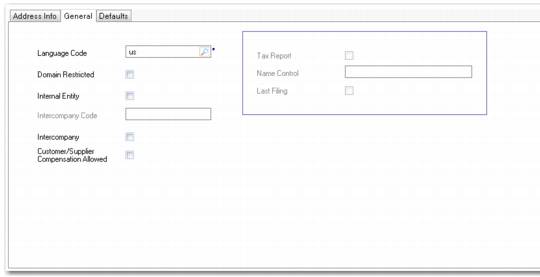
General Tab
Use the General tab to define general information about this business relation.
Business Relation, General Tab
Field Descriptions
Intercompany
Indicate if the business relation identifies an entity that is a member of a group of entities that trade with each other. When selected, you can enter an intercompany code in the Intercompany Code field.
Note: Intercompany transactions are not the same as cross-company transactions, which are always posted to the cross-company accounts associated with the domain. Intercompany transactions are typically recorded for entities that are not defined in your current database.
If the business relation is identified as an internal entity, the Intercompany field is automatically selected and you cannot change it.
Internal Entity
Indicate if the business relation identifies one of your entities within this database. Only records marked as internal display for selection as the address for a new entity.
If this is an internal entity, you can also update the Tax Report, Name Control, and Last Filing fields, which are used for filing 1099-MISC reports in the US.
For internal entities, the Intercompany field defaults to selected, and cannot be changed. You must specify an intercompany code to be referenced in intercompany and cross-company transactions.
You should ensure that you specify a correct primary contact for the headoffice address of an internal entity since it is printed in some AR functions such as Reminder Letters and Customer Statements.
Customer/Supplier Compensation Allowed
Select the field to allow open items for customers and suppliers that belong to that business relation to be netted against each other.
When customer and supplier compensation is enabled at entity level, the Customer/Supplier Compensation Allowed field must be enabled for the business relations involved for an adjustment to be saved. See
Setting Up Entities.
When customer and supplier compensation is disabled for the entity, this overrides the customer and supplier compensation setting for the business relation if compensation is enabled here. See
Open Item Adjustment.
Intercompany Code
When Intercompany is selected, you must enter an intercompany code. This code is linked to GL accounts and GL transactions for this business relation when an intercompany transaction is created. This in turn lets you identify transactions that can be eliminated during consolidation.
Typically you should enter an intercompany code that is the same as the entity code. This field is not validated, so you must plan your intercompany codes carefully.
The code entered here must match the intercompany code entered for GL accounts in order to generate intercompany reports.
The intercompany code must be unique for this business relation.
Tax Report
For an internal company, indicate whether to use this address for 1099 tax reporting. In the United States, the Internal Revenue Service requires companies to submit an annual 1099 form on payments to certain suppliers. Only company addresses are used for 1099 tax reporting.
Clear: This address is not used for 1099-MISC reports.
Select: This is the payer address to appear on 1099-MISC reports.
When this field is selected, you must supply values for name, first line of the street address, city, state, zip code, telephone number, and federal tax ID for the headoffice address. A warning displays when Name Control is blank.
More than one company address record can use the same federal tax ID, but only one of those records can have Tax Report selected. More than one company address record can have Tax Report selected, but only when the federal tax ID is different for each record.
Name Control
For an internal company, enter the IRS magnetic media control code assigned to this company.
In the United States, this code is assigned by the IRS and must be included on all 1099 magnetic media. This code is generally listed on your IRS mailing label and contains some combination of the first few letters of your company name.
When Tax Report is selected, a warning displays when this field is blank.
Last Filing
For an internal company, indicate whether this is the last time your company is filing a 1099-MISC under its current taxpayer ID number.
Select only if your company is going out of business or merging with another company.
Language Code
Enter the code identifying the language used by this business relation. The default is the language associated with the current user.
The code specified here sets the default for each address created for the business relation, but can be changed as needed.
The customer ship-to language defaults to sales documents, such as quotes, sales orders, invoices, and service return material authorizations.
You can select orders for printing by range of language codes. This lets you use preprinted forms in different languages.
Master comments are also stored by language. When you update comments during order entry, the system searches for comments stored in the document’s language. This lets you quickly access text, such as customs documentation or item descriptions, in the correct language.
Domain Restricted
Indicate if access to this business relation is restricted by domain. A restricted business relation can only be viewed, modified, and reported on in the domain in which it was created. If, for example, the database is organized by domain per country, you can use this restriction to ensure that users cannot accidentally or deliberately use a business relation that belongs to another domain and country.
The value for this field defaults from the Business Relations by Domain field in System Maintain (36.24.3.1). See
QAD System Administration User Guide.