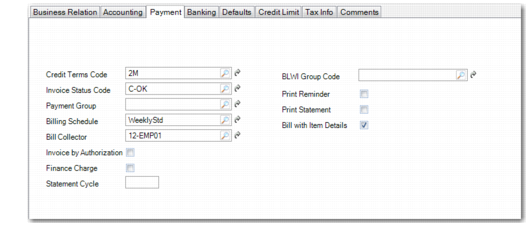
Payment Tab
Use the Payment tab to enter details on how payments from this customer are managed.
Customer Create, Payment Tab
Field Descriptions
Credit Terms
Specify the default credit terms for this customer. This field is required. See
Credit Terms for details.
Invoice Status Code
Specify the default invoice status for invoices for this customer. This field is required.
Generally, you specify a status that indicates invoices are uncontested. A contested invoice is typically a special condition.
Payment Group
Specify a payment group in which you want to include this customer.
Billing Schedule
Specify a billing schedule for the customer by selecting the appropriate billing schedule code.
Bill Collector
Assign a default bill collector.
Invoice by Authorization
Indicate how invoice totals should be calculated and displayed for this customer.
Clear: Invoice totals are calculated by line. This is the typical method for calculating totals, unless the customer is using AR Self-Billing.
Select: Invoice totals are calculated by authorization number. The printed invoice includes the price and amount for each authorization line, as well as the total for all authorization lines. The extended price for each invoice line item is not displayed.
This field is important for customers using the AR Self-Billing module and ensures that rounding errors do not occur between the AR amount calculated by Self-Bill Payment Application and the invoice amount. Rounding errors can prevent invoices from being closed or create unapplied payments.
Select this option if this customer typically pays invoices for items on scheduled orders using authorization numbers. When the self-payment is applied by authorization number, the amounts match exactly.
The value you specify in this field sets the default for the same field in Scheduled Order Maintenance (7.3.13). It can be changed for individual orders as needed. See
Self‑Billing for details on self-billing.
Finance Charge
Select this field to make this customer’s accounts liable for finance charges. If the customer has past due balances, finance charges are levied.
Clear this field to disable finance charge calculation for this customer.
See
Finance Charges on Overdue Payments for more information on how finance charges are calculated.
Note: You can use invoice status codes to keep individual customer invoices from being included in finance charges.
Statement Cycle
Specify a value to indicate how often you normally print AR statements for this customer.
The system checks the value of this field when generating statements for customers with Print Statement selected. You can select statements to print on a regular basis for each customer based on their cycle code.
BLWI Group
Specify the default group associated with this customer for Belgian-Luxembourgian BLWI reporting. The default code is 999.
Print Reminder
Indicate if reminders are typically printed for this customer to report past due balances.
Clear: The customer’s balance is not reviewed when Reminder Letter is executed, regardless of the selection criteria.
Select: When you generate reminder letters with the appropriate selection criteria, this customer’s accounts are reviewed. If the customer has past due balances, a reminder letter is printed.
Note: Customers are included in Customer Reminder Overview, an internal report, regardless of this setting.
Print Statement
Indicate if statements should be printed for this customer. When this field is selected, a statement is printed for this customer using the frequency specified in Statement Cycle.
Clear: A statement for this customer is never generated, regardless of the selection criteria used in Customer Summary Statement Print.
Select: Statements are included for this customer.
Bill with Item Details
To provide item line details in bills produced for this customer, select this field.