Customer Opening Balance and Invoice Numbering
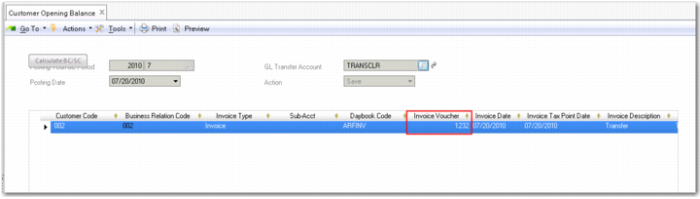
When you successfully save an opening balance entry, the grid is updated with the invoice number, as shown in
Customer Opening Balance Grid, New Invoice Number.
Customer Opening Balance Grid, New Invoice Number
The system includes three options for numbering invoices, credit notes, and invoice and credit note corrections:
• Standard invoice numbering without numbering checks. This option is the default, and applies if consecutive and chronological numbering are not enabled.
• Consecutive invoice numbering
If consecutive invoice numbering is enabled, the system ensures that invoices, credit notes, and invoice and credit note corrections are consecutive without gaps.
• Chronological invoice numbering—an extension of consecutive invoice numbering.
If chronological invoice numbering is enabled, the system ensures that invoices, credit notes, and invoice and credit note corrections are sequentially numbered in the correct date order and without gaps. Chronological invoice numbering can only be enabled if consecutive invoice numbering is also enabled.
You can configure whether the system displays a warning or an error when users attempt to save transactions with past or future posting dates, thereby disrupting the chronological numbering sequences.
For standard, consecutive, and chronological invoice numbering; invoices, credit notes, and invoice and credit note corrections are numbered by entity, year, GL period, and daybook.
You enable consecutive and chronological invoice numbering, and select a warning or error option at domain level. See
Invoice Numbering Tab.
When chronological invoice numbering is enabled, the numbering controls described in this section apply in Customer Opening Balance Create and Supplier Opening Balance Create, and in all customer and supplier invoice functions.
The following chronological invoice numbering controls apply:
• If you attempt to save an invoice with a posting date that is earlier than the posting date of a saved invoice with the same entity and daybook combination, the system displays an error or warning message, depending on the option selected in the domain Invoice Numbering tab.
Past Invoice Date Error
• If you attempt to save an invoice with a future posting date, the system displays an error or a warning, depending on the option selected in the domain Invoice Numbering tab.
Future Posting Date Error
• When you attempt to save the first invoice in a new GL period for a daybook and entity combination, the system displays a warning.
Note: This message is always a warning.
First Invoice in GL Period Warning