Journal Entry Auto Balancing
When you create a posting, the system calculates the value of the posting in base currency or statutory currency, or in both currencies. Normally, the base currency debit and credit totals and the statutory currency credit and debit totals must be equal for the posting to be saved. However, if Journal Entry Auto Balancing is enabled, you can save a posting even if the posting is not balanced in base currency or in statutory currency, within certain limits. To balance the posting, the system automatically creates an additional posting line that balances the whole transaction. The additional posting line is made to an Auto Balance system account.
The system creates a balancing posting when the following conditions apply:
• An Auto Balance system type account is defined for the GL shared set of the current domain.
• A posting is unbalanced in base currency, statutory currency, or in both currencies even after all existing mechanisms, such as rounding and exchange gain or loss, have been applied.
• At least one of the transaction currency, base currency, or statutory currency amounts is balanced (for automatic postings only)
• The unbalanced amount is sufficiently small; that is, less than or equal to the maximum number of posting lines minus one, multiplied by the rounding unit.
Example:
The rounding for a currency is two decimal places, the threshold is .005, and the rounding unit is .01.
If a posting has four lines, the limit is:
(4 -1) * .01 = .03.
In this case, any balance differences of .03 or less are posted automatically to the Auto Balance system account.
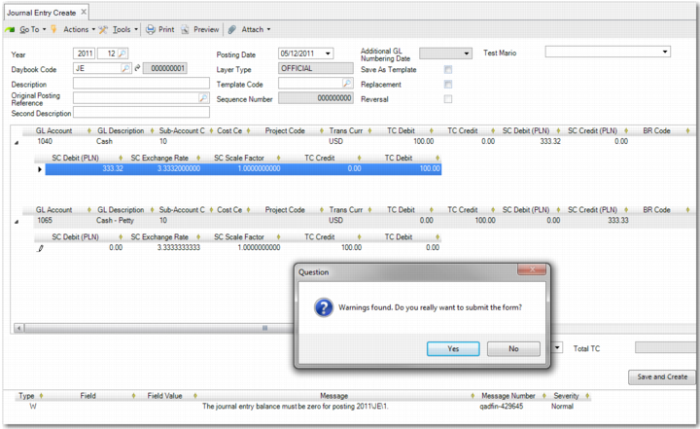
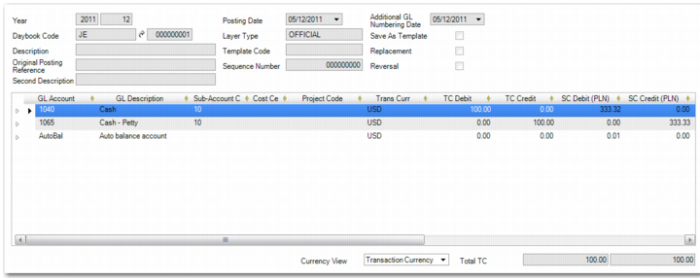
Journal Entry Auto Balancing applies for any posting, regardless of its origin; for example, manual posting, automatic posting, or journal entry excel integration. The balance of the posting is calculated at the last stage during the saving of the posting. When the balancing posting line is created, the system displays a warning message.
Journal Entry Create, Autobalance Warning
Journal Entry Create, Autobalance Posting
When a balancing posting is created, the system also sends a notification e‑mail to all users linked to the PostAutoBalNotify role in the entity in which the posting was created.
You must regularly review the postings to the Auto Balance account and reallocate them to the correct GL account. Otherwise, incorrect financial reports can be produced. You can manually reallocate the Auto Balance postings using manual journal entries or using Journal Entry Excel Integration Repair.
Consistency Checks Execute includes a check to determine if any postings remain on the Auto Balance system account at period end. If postings remain, the system raises a warning, but you are not prevented from setting the GL period to Reported. The Entity GL Period functions also perform the same check if you attempt to set the status of a GL period to Reported.
When you run Year End Closing Execute, the system checks if there is an outstanding balance on the Auto Balance system account for that year. Use the Y/E Close Auto Balance Check on the General tab of the Entity record to indicate how Year End Closing proceeds if there is an outstanding balance. See
Setting Up Entities. This check is performed on the official and management layers only. Postings to the transient layer for the Auto Balance account do not affect the Year End Closing. See
Year-End Transactions for more information on Year End Closing Execute.
Important: You must clear both the debit and the credit balances on the Auto Balance account separately. You cannot clear the net balance alone.