Importing from Excel
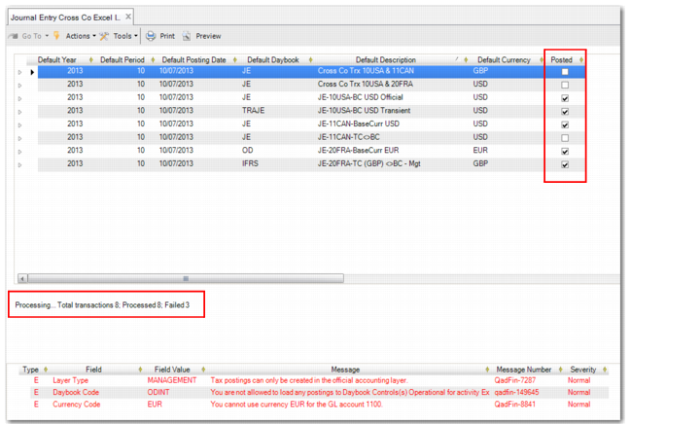
When you are finished editing your spreadsheet in Excel, open Journal Entry Cross Co Excel Integration, right-click in the grid, and select Import from Excel. The entries defined in your spreadsheet are loaded into the grid in Journal Entry Cross Co Excel Integration, as displayed in
Cross-Company Journal Entry Integration Single Entity and Cross-Company Postings.
When you click Save in Journal Entry Cross Co Excel Integration, the system creates journal entries for the source entity and for each of the corresponding postings for the target entities. It also performs all validation and defaults values if some key fields are blank. If you specify all required values, no defaulting occurs. See
Validation and
Defaulting for more information.
Two areas of the Journal Entry Cross Co Excel Integration screen indicate whether or not postings are processed successfully. The Posted field at Level 1 of the grid is automatically selected by the system as each transaction is processed and saved successfully. In addition, the processing status indicator at the bottom left of the screen indicates the status of records. The screen is locked during the saving process.
Journal Entry Cross Co Excel Integration, Status Indicators