Payments Tab
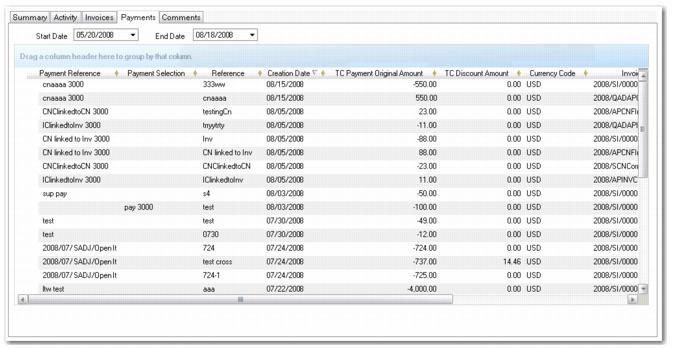
Use the Payments tab to view the payments and payment selections sent to this supplier for a specified date range. Double-click a line on the grid to view the original payment.
Supplier prepayments created using Banking Entry display as payments in the Supplier Activity Dashboard.
Supplier Activity Dashboard, Payments Tab
Field Descriptions
Payment Reference
This field displays the reference for the payment, typically the supplier’s invoice number.
Payment Selection
This field displays the payment selection code.
Reference
This field displays the reference text entered on the original payment
Status
This field displays the status associated with the payment.
Payment Number
This field displays the number of the payment, which consists of a concatenation of the payment year/payment instrument/payment number.
Base Currency
This field displays the base currency of the domain in which the payment was created.
Creation Date
Displays the payment creation date.
Payment Due Date
Displays the date when payment was due.
Discount Due Date
Displays the discount due date.
OI Description
If the invoice was adjusted using open item adjustment, this field displays the description recorded in Open Item Adjustment Create (25.13.5) or Open Item Adjustment Modify (25.13.3).
See
Open Item Adjustment for more information.
BC and TC Payment Original Amount
Displays the original invoice amount in base and in transaction currencies.
BC and TC Open Amount
Displays the open (unallocated) invoice amount.
# Days overdue
Displays the number of days overdue, calculated by subtracting the due date from the paid date.
Week #
Displays the week number in the accounting year.
Registration Number
This field displays the registration number of the invoice to which the payment was allocated.
The registration number identifies all supplier invoices and credit notes in the system, both initial and standard, and is an automatic number generated by entity and year.
Bank Import Reference
If the payment was imported using a bank file, this field displays the lock box batch ID of the imported transactions. If the lock box ID is unavailable, this field displays the filename of the imported bank file.
See
Electronic Processing for more information on importing bank files.
Comments Tab
The Comments tab displays comments recorded for this supplier in the supplier record.