Shared Set Merge
Use Shared Set Merge (36.25.91) when you want to unify separate shared sets in domains. The function replaces the records in one shared set (the target) with those of another shared set (the source) so that you only need to maintain one shared set instead of two.
Before using Shared Set Merge, carefully consider the domains and shared sets in your system, and plan which sets you want to merge.
You can run Shared Set Merge in two modes: Validation and Merge. Validation mode compares the target and source shared sets you have specified and reports on conflicts; no actual merging is performed. You must rectify the conflicts and rerun Shared Set Merge until no conflicts exist before you run the program in Merge mode.
When run in Merge mode, Shared Set Merge:
• Replaces all instances of the target shared set ID with the source shared set ID.
• Changes any non-validated field values in the target shared set to the values for the same fields the source shared set if there is a discrepancy.
• Merges profile code objects if identical, and if not, uses the source shared set values.
• Converts transaction history, as appropriate.
If you run Shared Set Merge in Merge mode and the program finds errors, it stops the merge and reports the errors. The merge cannot continue until all errors are rectified.
Example:
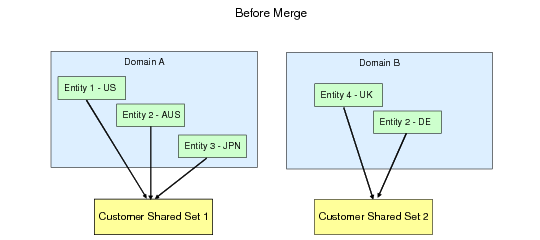
A company has two domains: one for the US and Asia-Pacific (Domain A), and another for Europe (Domain B). Each domain uses a separate customer shared set.
Shared Sets, Before Merge
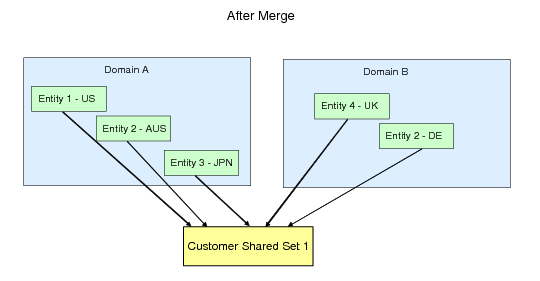
After resolving all errors found in Validation mode, the company runs Shared Set Merge in Merge mode for Customer Shared Set 1 and Customer Shared Set 2. In this case, Customer Shared Set 2 is the source and Customer Shared Set 1 is the target. All references to Customer Shared Set 2 in Domain B are deleted and replaced by references to Customer Shared Set 1.
Shared Sets, After Merge
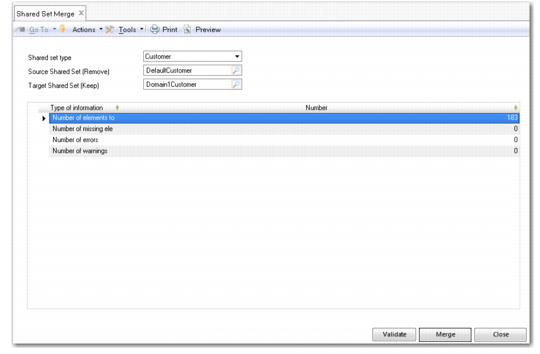
Shared Set Merge shows Shared Set Merge (36.25.91).
Shared Set Merge
Shared Set Type
Select the type of shared sets you want to merge. The shared sets to merge must be of the same type.
Source Shared Set
Specify the shared set you want to merge and remove. You can only select from shared sets of the type you specified in the Shared Set Type field.
Target Shared Set
Specify the shared set that will contain all the merged data and which will be retained. You can only select from shared sets of the type you specified in the Shared Set Type field.