Receiver Matching Create
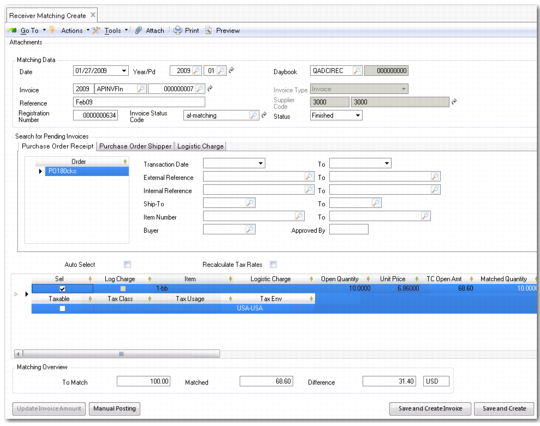
Receiver Matching Create (28.2.1) is displayed when you click Matching on a supplier invoice, and is also accessed by selecting the menu option directly.
The receiver matching screen has multiple areas:
• Matching Data. Use this panel to complete the posting details for the receiver matching posting.
• Search for Pending Invoices. Use these filter fields to retrieve purchase orders if you have not loaded the purchase order through the supplier invoice screen.
• Matching Grid. Use this grid to match the purchase order amounts and make variance adjustments for taxes, quantities to be invoiced, and costs of items.
• Matching Overview. This panel displays the receiver amounts, the invoice amounts to be matched, and the difference between the two, and displays the following:
Amounts without taxes
Recoverable and non-recoverable taxes accrued at receipt
Recoverable and non-recoverable taxes accrued at invoice
Manual posting amounts (if any)
Totals
Receiver Matching Create
Field Descriptions
Matching Data
Date
Specify a date for the matching posting. The default is the system date.
Year/Pd
Specify a year and period for the matching postings. This defaults to the year and period of the posting date. If you specify a different year/period, the posting date is changed accordingly.
Daybook
Specify a daybook for the matching entries. You must select a matching daybook. If only one matching daybook exists in the system, it defaults automatically.
Invoice
Specify the invoice year, daybook, and number. These values default from the supplier invoice when you access receiver matching through the supplier invoice screen.
Invoice Type
This field indicates the type of invoice being matched: invoice, credit note, or correction.
GoTo
Click to display the invoice to be matched in view mode in a new screen.
Reference
Enter a matching reference. This field is typically used to record the invoice number on the document received from the supplier.
Supplier Code
The system displays the supplier code and business relation defined on the selected invoice.
Registration Number
This field indicates the invoice registration number.
Invoice Status Code
This field displays the invoice status code defined for the Status After Match field of the status code used on the invoice. See
Starting Receiver Matching.
Status
Specify a matching status.
Initial. When you save the matching with an initial status, no postings are created and updates to current and average costs from variance adjustments are not completed.
Finished. The Finished status updates costs and posts the matching to the official layer.
Pending Invoice Filter: PO Receipt Tab
Order
Click the lookup to select a purchase order. You can only select purchase orders for which receipts have been recorded. Right-click to add additional rows if you are matching more than one PO.
Transaction Date/To
Specify a range of transaction dates for selecting pending invoices to process.
External Reference/To
Specify a range of external reference numbers for selecting pending invoices to match. The external reference number is typically the supplier’s invoice number, carrier tracking number, bill of lading number, or packing slip number.
Internal Reference/To
Specify a range of internal reference numbers for selecting pending invoices to process. Internal references are used to track orders internally, such as a receiver number.
Ship-To/To
Specify a range of ship-to address codes for selecting pending invoices to process. The ship-to address is printed on the purchase order.
Item Number/To
Enter a range of item numbers for selecting pending invoices to process.
Buyer
Enter a buyer for selecting pending invoices to process.
Approved By
Specify the code of the buyer who approved the original purchase requisition for selecting pending invoices to process.
Auto Select
Select this field if you want to automatically select all of the matching pending invoices in the grid for processing. You can then deselect any pending invoices you do not want to include.
Leave the field clear to display all matching pending invoices unselected. You must then select each pending invoice you want to process. The value for Auto Select defaults from Supplier Invoice Control. See
Invoice Open Qty/Amt.
Recalculate Tax Rates
This field defaults to the value set in Supplier Invoice Control. See
Supplier Invoice Control Settings.
Click Search to apply the search criteria and display pending invoices in the matching grid.
Pending Invoice Filter: Purchase Order Shipper Tab
Use this tab to retrieve PO shipper/invoices for matching. See
PO Shipper/Invoices for details.
PO Shipper/Invoice
Specify a PO shipper/invoice number. If you do not specify a supplier in the matching data, the lookup returns all receipts.
Note: None of the details of the shipper/invoice can be modified.
Pending Invoice Filter: Logistics Charge Tab
The Logistic Charge tab in Receiver Matching lets you match accrued logistic charges against supplier invoices. You can retrieve and match pending invoices for both inbound and outbound logistics charges.
The currency of the logistics charges you try to match is taken from the pending invoice that was created for the charges, and the currency of the pending invoice and the matching invoice must always be the same.
Include Blank Suppliers
Select the field to include logistics charges that do not reference a logistics supplier. This field is enabled using the Match Blank Suppliers field in Logistics Op Accounting Control (36.9.1).
When Match Blank Suppliers is Yes in Logistics Op Accounting Control, you can indicate whether to display pending invoices with blank supplier fields. Otherwise, only pending invoices for the specified supplier are displayed. When Match Blank Suppliers is No, the Include Blank Suppliers field is not available.
Transaction Date/To
Specify a range of transaction dates for selecting pending invoices to match.
External Reference/To
Specify a range of external reference numbers for selecting pending invoices to match.
For inbound logistics charges, the reference is generally the packing slip number from the PO receipt.
For outbound logistics charges where sales order shippers are used, the Carrier Reference ID is the external ID for the logistics charge pending invoice. If you are not using shippers, the bill of lading is the external reference number.
Internal Reference/To
Specify a range of internal reference numbers for selecting pending invoices to match.
For inbound logistics charges, the internal reference is the receiver number from the PO receipt.
For outbound logistics charges, the internal reference is the shipment ID, which is determined using the Sales Order Shipment Sequence ID and Distribution Order Shipment Sequence ID fields in Logistics Accounting Control (2.15.24). These two sequence IDs are defined in Number Range Maintenance (36.2.21.1).
Order
Specify a range of order codes for selecting pending invoices to match.
Ship-From/To
Specify a range of ship-from address codes for selecting pending invoices to match.
Ship-To/To
Specify a range of ship-to address codes for selecting pending invoices to match. The ship-to address is printed on the purchase order.
Logistic Charge
Specify a logistics charge code to select associated pending invoices to match.