Exchange Data Repository
Use Exchange Data Repository Maint (35.9.3) to modify or add data in the exchange file portion of the data repository. For example, you can use this program to add a value to a missing mandatory field that is preventing the transformation process from completing.
The exchange file repository includes two types of data:
• Inbound exchange files that have been loaded from the EC subsystem SNF files but have not been transformed for transfer into your system
• Outbound exchange files consisting of transformed business document data that has not been unloaded to the EC subsystem
Note: The repository stores all exchange files that pass through it during processing, whether or not they complete all the subsequent steps. These exchange files remain in the repository until they are archived and deleted. See
Archiving and Deleting EDI eCommerce Data.
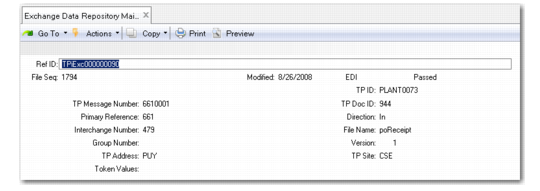
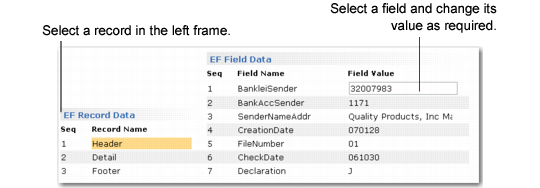
This program includes three frames. When you select an exchange file to maintain in the first frame, the system displays trading partner data and reference information about the exchange file. Use the second and third frames to select the exchange file record and field that contains the data you want to maintain.
Note: A .NET UI menu collection lets you select a repository record through a browse. You can view or update associated records in both repositories, as well as reprocess them after correcting problems, through a single UI. Its repository maintenance functionality is similar to this program. See
Maintain eCommerce Repository Data Collection.
Exchange Data Repository Maint (35.9.3)
Ref ID
Enter the reference number of the repository record you want to maintain. Use the arrow keys to scroll through the list of available record IDs.
When you choose Go, the system displays two additional frames.
Because of the possible many-to-one or one-to-many relationships between exchange files and application files, the sequence numbers assigned to the files do not stay the same throughout processing. eCommerce provides a tool for determining cross-references between numbers.
Exchange Data Repository Maint, EF Record and Field Data Frames
Seq and Record Name
The sequence numbers and names associated with the records in the selected exchange file.
Use the arrow keys to move through the records in the file. Choose Go to select the record whose fields you want to change.
Seq and Field Name
The sequence numbers and names associated with the fields in the selected exchange file record.
Use the arrow keys to move through the field sequence numbers. Choose Go to select the field whose value you want to change.
Field Value
The system displays the current value of this field in the selected record.
Enter or change data as required. Choose Go to record the change and return to the Seq field.
When all field entries are complete, choose End to return to the EF Record Data frame.