Archiving and Deleting EDI eCommerce Data
EDI eCommerce provides no automated features for purging the database of repository documents and other information that are no longer needed. To maintain control of disk space, regularly run an archive/delete utility. EDI eCommerce includes delete/archive programs used for several types of data:
• Repository document data
• Text comment data
• Turnaround data
• Document tracking records
Repository Data
Two programs are available for deleting unneeded repository documents:
• Use Inbound Delete/Archive (35.17.13) to delete and archive imported documents from the exchange file and application document repositories.
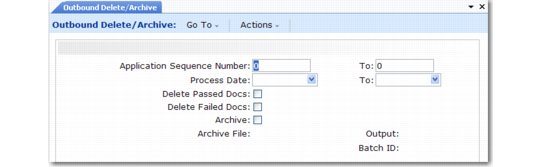
• Use Outbound Delete/Archive (35.17.14) to delete and archive exported documents from repositories.
The two programs function identically. Enter selection criteria to select repository documents by combinations of file sequence numbers and processing dates. Then, specify whether to select documents that passed, failed, or both.
The outbound program selects records based on application sequence numbers; the inbound program uses the exchange sequence as the selection key. Each program automatically looks up cross-references to corresponding records in the other repository (exchange or application) and deletes/archives them.
An archive program is usually run twice. First, run the program with all Delete fields set to No and review the report. Then, run it again with the appropriate field or fields set to Yes.
When Archive is set to Yes, the system stores deleted data in a file named xxyymmdd.hst. xx is ob for outbound documents and ib for inbound documents, and yymmdd is the date you ran the archive function. You can restore this file to the system using Archive File Reload (36.16.5).
Warning Deleted data that is not archived cannot be recovered.
Important: Date and time in the stored data are formatted based on the country code associated with the user who archived the data. If a user with a different date and time format reloads the data, load errors and corrupted data can occur.
To avoid these problems, use the same settings when archiving and reloading the data. Before loading data, use User Maintenance (36.3.1) to temporarily change your country code to match that of the user who archived the data.
Outbound Delete/Archive (35.17.14)
Text Comments
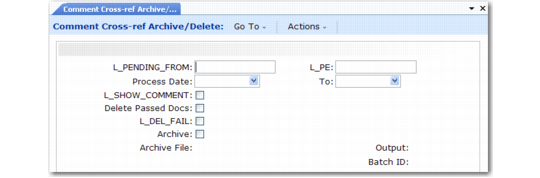
Use Comment Cross-Ref Archive/Delete (35.17.15) to archive and delete records containing imported text comments cross-referenced to sales orders or scheduled orders.
The system deletes such documents automatically only when the trading partner’s record in Trading Partner Parameter Maintenance (35.13.10) includes a Remove Connected Comments parameter set to Yes. Otherwise, run this program to delete unneeded comment files.
Comment Cross-Ref Archive/Delete (35.17.15)
This program is similar to the repository delete/archive programs. Enter selection criteria as required to select documents by ID numbers included in the imported comments file or processing dates. Then, specify whether to select documents that completed processing by successfully attaching the comment text to the order, documents that did not, or both.
Optionally, you can have the system display the comments selected for deletion. When you choose to archive comment data, the system places it in a file named obyymmdd.hst, where yymmdd is the date you ran the archive function.
Turnaround Data
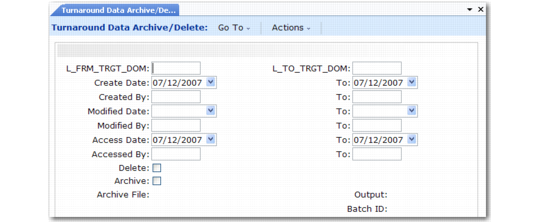
Use Turnaround Data Archive/Delete (35.17.16) to delete from the system and optionally archive turnaround data that is no longer required.
Turnaround Data Archive/Delete (35.17.16)
There is no other mechanism for selecting and deleting turnaround data records. How often you run this function depends on how long you are required to retain turnaround data in your database.
This program is similar to the repository delete/archive programs. Select records based on ranges of dates and user IDs. When you choose to archive turnaround data, the system places it in a file named tayymmdd.hst, where yymmdd is the date you ran the archive function.
Document Tracking Records
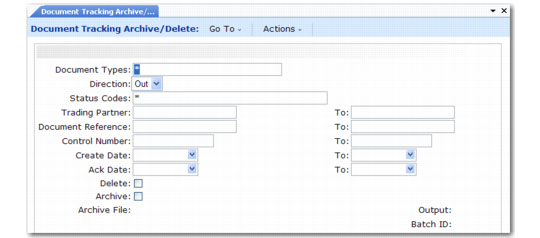
Use Document Tracking Archive/Delete (35.9.16.13) to delete from the system and optionally archive document tracking records that are no longer required. How often you run this function depends on how long you are required to retain tracking data in your database.
Document Tracking Archive/Delete (35.9.16.13)
This program is similar to the repository delete/archive programs. Select records based on ranges of document information and dates. You can also enter comma-separated lists of document types and status codes. To select all records regardless of document type or status code, leave the asterisk (*) in the appropriate field.
Note: Leave Direction set to Out. Document tracking currently supports only exported documents.
When you choose to archive document tracking data, the system places it in a file named obyymmdd.hst, where yymmdd is the date you ran the archive function.