Depreciation Books
Access this function by choosing Books on the Fixed Asset Maintenance header.
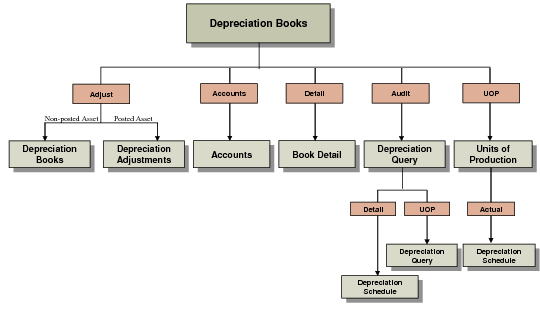
Depreciation Books Screen illustrates the different screens you can access with the navigation buttons.
Depreciation Books Screen
Use this function to assign or change depreciation books for the asset. Books default from the asset class. You can change the default books or add other books.
If the asset has been posted to the GL, you cannot modify the depreciation books.
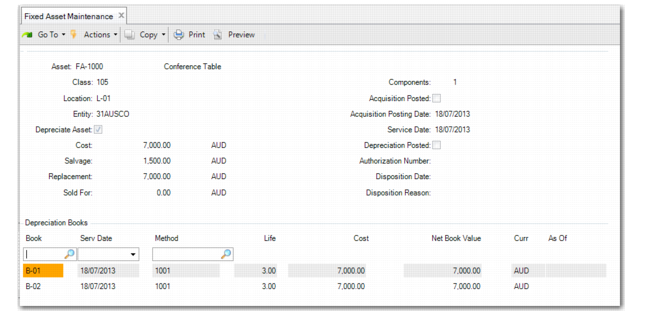
Fixed Asset Maintenance, Depreciation Books
Book
Enter a predefined book ID. Define books in Book Maintenance. An asset must have a posting book to record fixed‑asset transactions in the GL. An asset can be depreciated under an unlimited number of non‑posting books. See
Setting Up Books.
Serv Date
Enter the date that depreciation calculation starts. The service date must be a valid date in the GL calendar or in the fixed‑asset calendar associated with the book if it is a non‑posting book.
Method
Enter an active depreciation method ID. Set up methods in Method Maintenance. The ID is a four‑character alphanumeric ID and cannot start with a zero. See
Setting Up Methods.
Life
Enter the expected useful life for assets depreciated by this method. The expected life is used in calculating depreciation over the life of the asset.
Cost
Enter the acquisition cost. This amount is used to determine the basis for the book. The default is the cost from the Fixed Asset Maintenance header.
When you specify the asset cost amount in the Fixed Asset Maintenance header, the base currency amount for the primary book is calculated according to the accounting exchange rate on the asset acquisition effective date. If the primary book currency is the base currency, the Cost field for the primary book displays the same amount as defined in the Fixed Asset Maintenance header.