QAD 2017 Enterprise Edition > User Guides > Global Tax Management > Implementing GTM > Setting Up Tax Environments
  
Setting Up Tax Environments
Transactions are subject to the tax laws of both your company and the customer or supplier. Before the system calculates taxes, it determines which taxes (state sales tax, local tax, VAT, and so on) apply to the addresses that ship and receive the goods.
A tax environment is the set of tax types that applies to a combination of ship-from and ship-to tax zones and optionally a customer or supplier tax class. Tax environments apply to all domains in the database.
Before you set up tax environments, identify the combinations of tax types that apply to transactions. Then, determine the tax zones and customer/supplier tax classes that are subject to these tax groups.
You can simplify setup of tax environments. If all shipments to or from a tax zone are taxed the same way, leave either the ship-from or ship-to zone blank. At least one zone must be specified.
You may be able to specify a sums-into tax zone that encompasses many lower-level zones. Finally, you can leave the tax class blank if the tax types apply to all customers and suppliers in the indicated tax zones.
Each tax type in the environment has a calculation sequence and rounding method. The sequence determines the priority for calculating taxes when there are multiple tax types in the environment. The rounding method determines how the tax type is rounded.
Example: Suppose that shipments that start and end in the U.S. state of Florida can be subject to (1) state tax only, (2) state and county tax, or (3) state, county, and city tax. Sample tax environments are illustrated in Tables 2.5 through 2.7. The tax types apply to all tax zone combinations in the environments.

Default Florida State Tax Environment (1)
 
Ship-From Zone
Ship-To Zone
Tax Class
Tax Type
Sequence
Rounding
FL
FL
FL-STATE
1
2
 
 
DRUG


FOOD


Environment for Cities Subject to Florida Tax and Seminole County Tax (2)
 
Ship-From Zone
Ship-To Zone
Tax Class
Tax Type
Sequence
Rounding
FL
FL-ALTSP
FL-STATE
1
2
FL
FL-LMARY
DRUG
FL-SEMCO
2
2
FL
FL-LONGW
FOOD


FL
FL-SANFO


FL
FL-WINSP


Environment for Cities Subject to Florida Tax, Orange County Tax, and Orlando City Tax (3)
 
Ship-From Zone
Ship-To Zone
Tax Class
Tax Type
Sequence
Rounding
FL
FL-APOPK
FL-STATE
1
2
FL
FL-LUNDE
DRUG
FL-ORACO
2
2
FL
FL-OCOEE
FOOD
FL-ORLAN
3
2
FL
FL-OVIED


FL
FL-WINPK


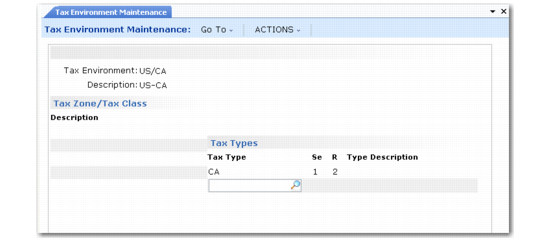
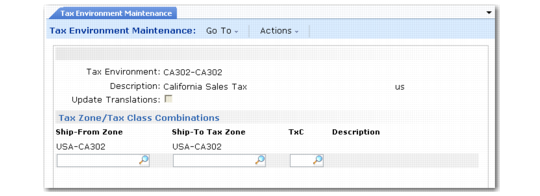
Set up tax environments in Tax Environment Maintenance (29.3.1). To verify data setup, use Tax Environment Browse (29.3.2) and Report (29.3.3).

Tax Environment Maintenance (29.3.1), Tax Zones/Tax Class Combinations
Tax Environment
Enter a code (maximum 16 characters) that identifies a set of tax types for a tax zone/tax class combination. On transactions, this code identifies the transaction or line-item tax environment.
Description
Enter a brief (maximum 24 characters) description of the tax environment. This field is required, but does not have to be unique.
Multiple language descriptions are supported. See Multiple Language Descriptions for details.
Update Translations
Enter Yes if you want to create or modify descriptions for this tax environment in multiple languages; otherwise, enter No.
Ship-From Zone
You can specify the tax zone from which goods are shipped. However, if all shipments to the environment’s ship-to zone are taxable regardless of origin, leave the ship-from zone blank.
Note: Either Ship-From or Ship-To Zone can be blank; not both.
Ship-To Zone
You can specify the tax zone to which goods are shipped. However, if all shipments from the environment’s ship-from zone are taxable regardless of destination, leave the ship-to zone blank.
TxC (Tax Class)
You can enter tax classes for customers and/or suppliers subject to the tax types in the environment. If all shipments are taxable regardless of customer or supplier, leave the tax class blank. Do not enter item tax classes; GTM only uses these to select tax rates.
Description
Optionally specify a description of the combination of ship-from, ship-to, and tax class.

Tax Environment Maintenance (29.3.1), Tax Types, Sequences, and Rounding Methods
Next, enter the set of tax types that apply to sales and purchases between the ship-from and ship-to zones. The system selects the tax rate for the tax class, tax usage, and transaction tax effective date. The sequence field determines the order in which the tax rates are applied.
Tax Type
Enter the type codes to include in the environment. The codes you enter apply to all combinations of ship-froms, ship-tos, and tax classes in the environment.
Note: You cannot specify a tax type that is designated for use in withholding tax.
Seq (Sequence)
Specify the priority in which tax types are calculated in a tax environment. The tax type that is calculated first must have a lower sequence number than the other tax type. If all taxes are calculated independently of each other, leave the sequence number for all tax types set to 1.
In tax-on-tax situations in which a tax includes another tax amount, enter a lower sequence number for the tax that is calculated first. For example, in some Canadian provinces, provincial sales tax (PST) is based on the item amount plus the goods and services tax (GST). GST has a lower sequence number than PST. See Tax-on-Tax.
R (Rounding Method)
Rounding method determines how tax amounts for the tax type are truncated. The rounding method defaults from Global Tax Management Control (29.24), but you can override it if the tax type requires a different method. Define rounding methods in Rounding Method Create (26.2.1).
Type Description
This field contains the tax type description.
In addition to the other tax environment codes, set up an error code and specify it in Global Tax Management Control (29.24). When you enter a transaction, GTM attempts to match the ship-to/ship-from tax zones and customer or supplier tax class to a tax environment. If it cannot find one, it assigns the error environment. To make it easier to identify error conditions, set up a meaningful code such as ERROR-ENVIRON. See Setting Up GTM Control.