Kanban Overview
These topics describe the Kanban module. It provides features that support creating kanban loops, defining production processes to supply them, recording kanban signals and automatically generating inventory transactions, and analyzing kanban and buffer sizes to determine the most efficient quantities.
Introduction to KanbanIntroduces the basics of kanban and its uses.
Key Concepts in KanbanDiscusses kanban loops, supermarkets, processes, calculated values, EPEI, card accumulators, limited-use cards, kanban transactions, inventory effects, card reconciliation, and EDI eCommerce.
Kanban WorkflowSummarizes the activities for setting up and managing Kanban.
Introduction to Kanban
Kanban is a method of just-in-time (JIT) production that uses standard containers or lot sizes with a single card attached to each. It is a pull system in which work centers use a card to signal that items are to be withdrawn from supply sources. The Japanese word kanban, loosely translated, means card, billboard, or sign. The term is often used synonymously for the specific scheduling system developed and used by the Toyota Corporation in Japan.
The kanban system is conceptually very simple. It defines a communication signal or card indicating that items need replenishment.
Traditional production processes rely on schedules to push inventory into stocking locations. Kanban pulls material through the manufacturing process based on the actual demand from customer orders or production consumption. Kanban is an integral component of demand pull manufacturing, where material is pulled to where it is needed, when it is needed—and no sooner.
The Kanban module is a flexible, comprehensive set of tools for setting up, managing, and optimizing the performance of a pull-based kanban system. Features include methods of calculating key information that is vital to the success of the lean enterprise. For example, planners can have the system determine:
• Every-part-every interval (EPEI): The time needed to make all the parts built by a manufacturing process, allowing for changeover time. Accurate EPEI calculations let planners see opportunities for shortening the interval as much as possible so that lead times can be minimized, on-hand inventories can be limited, and the overall process can be more flexible and responsive to variability in product mix and demand.
• Takt time: The pace at which a production process must operate to meet customer demand. Accurate takt time measurements let planners synchronize production at key processes with the anticipated rate of sales.
The system provides two options for supporting the most common forms of kanban: one-card or two-card systems:
• In a one-card system, the same card both authorizes replenishment of the amount consumed and authorizes the completed items to be moved to the destination supermarket. For example, work center A produces a part used by work center B and delivers it to a supermarket. Work center B pulls a container from the supermarket when it needs material and may return an empty container. When B pulls the container, the kanban card is removed from the container and placed in the card rack at A. The kanban in A indicates an authorization for A to produce another container of parts.
• A two-card system, which has a move kanban and a replenishment kanban, is used when the movement of a container of parts may not trigger an immediate replenishment of that part. Items are pulled in one (move) quantity and replenished in another (replenishment) quantity. For example, items are moved to a destination supermarket in quantities of 10 and only produced at the supplying source in quantities of 50.
The inventory cycle within a kanban-driven pull system is referred to as a kanban loop—a source of supply and a consuming destination sometimes called a supermarket. The supplying source for a loop can be:
• Another supermarket
• A manufacturing process
• An external supplier
In addition to the supermarket, another lean manufacturing inventory management technique supported by the Kanban module is the first-in, first-out (FIFO) lane. This lets you move in-process material between operations or work cells when continuous flow is impractical without storing inventory in a supermarket. See
FIFO Lanes.
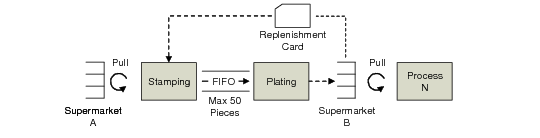
is a simplified example of how kanban cards, supermarkets, and FIFO lanes work together.
Simplified Kanban Example
In the example, Process N starts the initial pull cycle by removing items from Supermarket B. When the supermarket inventory level reaches a user-specified order point, Stamping receives a kanban card that authorizes it to produce the kanban quantity. Using material pulled from Supermarket A, Stamping processes items and places them in the FIFO lane—which holds no more than 50 items—as a source of supply for Plating. Stamping cannot produce more until space opens up in the FIFO lane as a result of parts being removed on a first-in, first-out basis by Plating. Plating moves completed items to Supermarket B for use by Process N, completing the loop.
The number of kanbans needed for a given item is determined by demand and the replenishment time. For example, if your company uses 500 of an item per day and it takes 3 days to replace the stock, then you need a minimum of 1,500 in the production process. The system offers a variety of automated tools for calculating the most efficient number of kanbans, as well as the other elements of the kanban loop, including the supermarket size. The system determines such key factors as the average demand for items and the every-part-every interval—a measure of how often a manufacturing process can build all the items it provides. See
Calculated Values.
For practical purposes, you should consider maintaining a small safety stock in the process as well. The system offers automated methods of determining the appropriate amount of safety stock without carrying excessive inventory in the supermarket. See
Safety Stock.
To track the movement of inventory and closely monitor the amount of inventory in the supermarket, the system provides a set of transactions that record cards as they move between supply sources and consuming destinations. See
Kanban Transactions.
Transactions can be automatically communicated to supplying sources using QAD’s Supply Visualization product. Color coding lets the supplier see the status of individual kanbans, as well as view such information as order points, supermarket sizes, and other key loop information to let them respond to demand more effectively. For information on QAD Supply Visualization, see the QAD Web site.
If you frequently run out of stock, there are not enough kanbans in the process and you should add more. If you regularly have an overabundance of stock, there are too many kanbans in the process and some should be inactivated.
It is usually better to have more kanbans with fewer parts in each than a few kanbans with a large number of parts. Smaller kanban sizes make it easier to adjust the number of kanbans in the process to satisfy demand. For example, you could have 15 kanbans containing 100 parts each. When demand for the part increases or decreases, you can adjust the number of kanbans in increments of 100 rather than increasing the kanban size.
The system includes several analytical tools that help make these critical decisions, letting you adjust card sizes and supermarket buffers appropriately to meet requirements without creating excessive inventory levels. See
Analysis, Scheduling, and Reporting.
The Kanban module expands the view of kanban loops by providing tools to monitor, maintain, and plan the entire process family—all of the items produced by a process, each with its own demand, cycle time, setup time, and buffer quantity. By evaluating the demands of the process instead of individual kanban loops, planners can see the effects of changing demand on the entire process, or supply chain of processes, as opposed to any particular loop.