Collecting Data Automatically
Performance data can be collected automatically during the following transactions:
• Schedule Update from MRP (5.5.3.1)
• Purchase Order Receipts (5.13.1)
• PO Shipper Receipt (5.23.20)
• RTS Receipts (11.7.3.13)
• Distributed Order Receipt (12.15.20)
• Document Import (35.1)
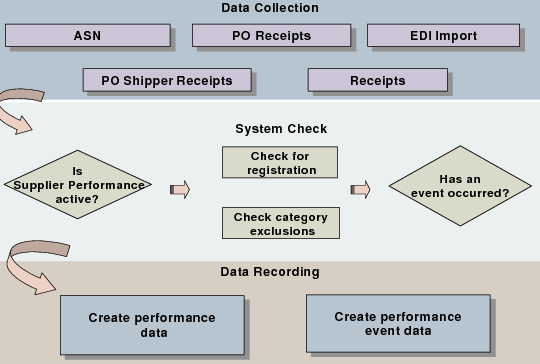
Each time a measurable transaction occurs, the system checks for associated registrations. Once a registration is confirmed, the performance data is recorded.
Automatic Data Collection Cycle shows the automatic data collection cycle.
Automatic Data Collection Cycle
When receipts and imports are processed for valid registrations, the system evaluates each receipt and EDI document import to determine if a performance event should be recorded.
Automatic Data Collection Events and Where They Are Captured shows all the automatically created performance events and where they are generated. As events are recorded and stored in the your database, you can run the Performance Report Card (5.15.15) or the Performance Data Report (5.15.14) to gauge the supplier’s performance against the system-defined categories used during automatic data capture.
Note: An enhanced .NET UI version of Performance Data Report is available on menu 5.15.38.
Automatic Data Collection Events and Where They Are Captured
Captured During | Possible Events | |
PO Receipts | Early Receipt Late Receipt | Overshipment Undershipment |
DO Receipts | Early Receipt Late Receipt | Overshipment Undershipment |
RTS Receipts | Early Receipt Late Receipt | Overshipment Undershipment |
ASN Import | Late ASN | Duplicate ASN |
Schedule Update From MRP | Missed Shipment | |
Understanding Automatic Data Collection
Several types of events are automatically generated during various transactions, as shown in
Automatic Data Collection Events and Where They Are Captured. These transactions, the possible events, and how the events are captured are discussed here.
PO, DO, and RTS Receipts
During a PO receipt, DO receipt, or RTS receipt, an early, late, overshipment, or undershipment event can be automatically generated, based on the following calculations:
1 The receipt date is compared with the planned receipt date. If the receipt is early or late, that number of days is compared with the values specified in Acceptable Days Early or Acceptable Days Late in the control program. When an acceptable value is exceeded, a late or early event is automatically created.
2 The receipt quantity is compared with the open quantity. If the receipt quantity is under or over the open quantity, that quantity is converted to a percent. The difference and difference percent are compared with the values in Acceptable Over Shipment (quantity), Acceptable Under Shipment (quantity), Acceptable Over Shipment (percent), and Acceptable Under Shipment (percent) in the control program. When one of these values is exceeded, an event is automatically created.
3 The cost of the quantity received is compared with the cost of the open quantity. If the quantity-received cost is more than the open-quantity cost, the cost difference is converted to a percent.The cost difference and cost difference percent are compared with the values in Acceptable Over Shipment (cost) and Acceptable Under Shipment (percentage). When one of these values is exceeded, an event is automatically created.
Advance Ship Notice
Late ASN events are recorded when the lead time for ASNs specified in Maximum ASN Lead-Time in Supplier Performance Control is exceeded. ASN lead time is the amount of time allowed between the time a shipment leaves the supplier’s dock and the time the ASN for that shipment is created and sent to the customer. Both of these times are contained within the EDI transaction.
Schedule Update from MRP
During Schedule Update from MRP only missed shipment events are generated. If any overdue quantity exists on the prior schedule as a new schedule release is being generated, that quantity is moved to the cumulative required portion of the schedules, and is seen as a missed shipment. A missed shipment event is automatically created. When the missed shipment arrives it is netted against the schedule and the missed shipment event is replaced with a late shipment event.