QAD 2017 Enterprise Edition
>
User Guides
>
Service/Support Management
>
Installed Base
>
End Users
>
Creating End Users Indirectly
Creating End Users Indirectly
You can also create end users during other service functions or when updating the installed base. You may know little about the end user, basically the name and address. Use End User Data Maintenance later to specify details about end users the system creates.
Creating End Users During Invoice Post
If Ship to Installed Base is Yes in Service Management Control, Invoice Post and Print can create installed base records for items shipped. If you have not already defined the ship-to on the sales order as an end user, Invoice Post and Print also creates an end-user record.
Update Installed Base defaults to Yes if both:
• Installed Base for the item in Service Item Maintenance is Yes.
• Create ISB for the end user is Yes.
If a ship-to address is not an end user, the item is an installed base item, and Create ISB in End User Control is Yes, Update Installed Base defaults to Yes in Sales Order Maintenance.
If SO Edit ISB Defaults is Yes in Sales Order Control, a pop-up window lets you update this value. Otherwise, it takes effect when Invoice Post and Print adds the item to the installed base and creates the end-user record.
Note: Invoice Post and Print (7.13.4) adds records to the system as customer ship-to addresses. You cannot change the address information with End User Data Maintenance but you can add end-user details. Change address details in Customer Ship-To Modify (27.20.2.2)
Creating End Users from Other Service Functions
When a business sells only to retailers or distributors, direct knowledge about end users may be unavailable. To identify end users, the business might use product registration cards, phone-in registration, or a contest registration.
Even with these mechanisms, such a business often finds out about end users when they call or attempt to start a service contract or return an item. Service personnel making the first contact are likely to be using one of the following:
• Call Maintenance
• Call Quote Maintenance
• Contract Maintenance and Contract Quote Maintenance
• RMA (Return Material Authorization) Maintenance
Since service personnel can add end users in these functions, the process is streamlined.
Note: Whether you can create end users in Contract Maintenance and Contract Quote Maintenance depends on the setting of Bill End Users. When you are billing end users, they must be set up previously in Customer Data Maintenance. See
Billing Customers or End Users.
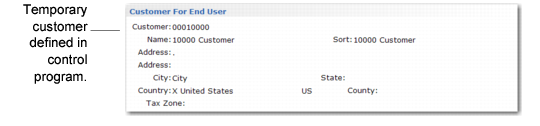
Customer for End‑User Frame illustrates the frame that displays in Call Maintenance when you leave End User blank and indicate that you want to add one.
Customer for End‑User Frame
By default, the first frame displays information about the temporary customer, as defined in Call Management Control. This lets you define an end user, and you can define an end user without a valid customer. This is essential if you service items sold through distributors or retailers and end users contact your company for service.
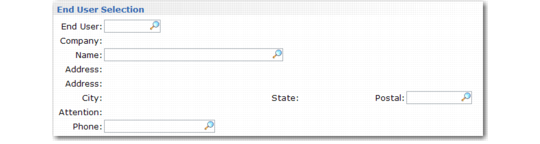
End‑User Frame illustrates the frame for specifying end-user information.
End‑User Frame
You can specify minimal information for the new end user.