QAD 2017 Enterprise Edition
>
User Guides
>
Service/Support Management
>
Multiple Time Zones
>
Overview of MTZ
Overview of MTZ
The Service/Support Management module provides many time-sensitive features. For example, you can define a duration and a number of hours per day for service coverage. The response time and coverage hours you associate with a service type determines when engineers should act on a call. Engineer scheduling uses these dates and times to assign an engineer to respond to the request.
When service providers and end users are located in different time zones, understanding these dates and times can become extremely complex. Using MTZ provides an integrated solution for organizations facing these issues. Since not all users of SSM manage calls across multiple time zones, MTZ is optional. As a result, most of MTZ’s data elements are not visible unless it is active.
When MTZ is not active, SSM uses the time zone specified on the domain record as the default value in date and time fields. MTZ also uses this date and time for storing most date and time information internally. However, before display, it converts times that are relative to an end user. To allow for conversion, you must set up and define the domain time zone explicitly. For more information on defining the domain time zone, see
QAD System Administration User Guide.
Activating MTZ and converting existing data is described fully in
Activating MTZ.
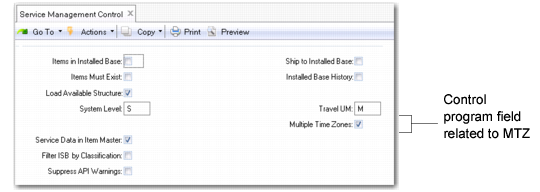
Service Management Control (11.24) illustrates three fields in Service Management Control that display values associated with MTZ. You cannot, however, always update these values directly in the control program.
Service Management Control (11.24)
Multiple Time Zones
This field indicates whether MTZ is active. You can update it in the control program when its value is Yes. Use the Multiple Time Zones Startup Utility (11.21.22.24) to activate MTZ. See
Multiple Time Zones Startup Utility.