QAD 2017 Enterprise Edition
>
User Guides
>
Service/Support Management
>
Automatic Pricing
>
Service Pricing Maintenance
Service Pricing Maintenance
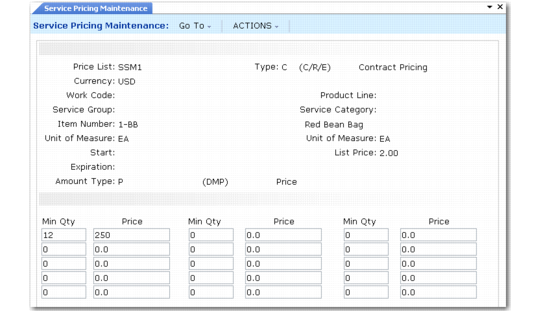
Service Pricing Maintenance (11.17.1) illustrates Service Pricing Maintenance (11.17.1). Remember when setting up price lists that you cannot use all fields for each type of price list, and not all combinations of fields are valid.
Sample Additional Charges and
Search Order for Repair Item Prices summarize valid combinations.
Service Pricing Maintenance (11.17.1)
Price List
Price list codes identify a pricing structure that defines specific prices at different quantity levels. State prices in terms of the domain base currency or any other valid currency. These tables determine the prices the system suggests for items and additional items on contracts; for items, labor, and expenses consumed in Call Activity Recording; and for expense costs in CAR, depending on the price list type.
Type
Select a price list type. Choices are:
• C for contracts
• R for repairs
• E for expense costs
Currency
Enter the currency of the prices on this price list. The system uses this price list only if the currency of the service transaction is the same as the price list currency. If you do not set up a price list in the currency of the service transaction, item prices default from the list price in Item Master Maintenance or are blank and you must specify them.
Work Code
Work codes designate what type of work is performed during service activity. Set up prices based on the kind of work being done. For example, preventive maintenance labor may cost less than repair labor or installation labor. Work Code does not apply to type C lists.
Service Group
If you assign each item you set up with Service Item Maintenance to a service group that represents your grouping scheme, you can base repair and cost prices on the group. For items consumed in CAR, this is the service group of the item consumed. For labor and expenses, this is the service group of the item being repaired.
Product Line
Each item in the item master must belong to a product line. Base contract, repair, and cost prices on product line. For contracts, this is the product line of the item being supported. For items consumed in CAR, this is the product line of the item consumed. For labor and expenses, this is the product line of the item being repaired.
Service Category
Set up repair price lists for labor and expenses and expense cost lists by service category. If you specify a service category, you can also specify a product line, service group, or work code; item number must be blank. Service category must by for expenses or labor.
Item Number
A warning displays if the item is not a valid item number in the item master or an additional charge item defined with Additional Charge Maintenance. However, you can define prices for items you do not manufacture. You can specify item numbers only on a contract or repair price list, and then only if service group, product line, and service category are blank. Specify additional charges only on a contract price list.
Unit of Measure
Indicate the unit of measure associated with this price list structure. For service price lists, this is normally blank. For an inventory item, unit of measure can be blank; If you specify a value here, it must be the item’s unit of measure as defined in the item master or one of the special service units of measure. Leave UM blank for the other price list structures and for contract additional charge items.
• If the price list is for items consumed in CAR, you can specify the exchange unit of measure, defined in Call Management Control, for credit amounts for items returned.
• You can use the fixed price unit of measure defined in Call Management Control to specify an amount for a fixed price repair. In this case, the item number refers to the item being repaired, not an item being consumed.
Unit of Measure and List Price
If you specify an item defined in the item master, the primary description, unit of measure, and list price in Item Master Maintenance display for reference.
Start and Expiration
Enter values to determine the effective dates for this price list. If blank, the price list is always effective. When determining which price list to use, the system compares the transaction date with the price list start and expiration dates. If the transaction date falls on or between these dates, the system selects the price list with the latest start date that has not expired.
Important: The system finds a price list with a blank effective date first, so make sure you use effective dates consistently.
Amount Type
The default is P unless this is a percentage additional charge item, in which case it defaults to M. Possible values are:
D (Discount %). Discounts are percentages the system takes from the item list price defined in the item master. Use the type D amount type for contract prices and percentage additional charges, and for repair prices for items.
M (Markup %). Markups are percentages the system adds to the item GL cost at the relevant site. Use the type M amount type for contract prices and percentage additional charges; for repair prices for items, labor, and expenses.
P (Price). A type P price list specifies a price amount. Use the type P amount type for contract prices and fixed additional charges; for repair prices for items, labor, and expenses; and for expense cost lists.
Min Qty
The minimum order quantity required for this price structure to apply. Quantity sets different prices at different order quantities. For example, you may offer a lower price when more than 5 items are consumed in CAR or more than 10 hours of labor are used. The system allows up to 15 different quantity levels. Enter quantity levels in ascending sequence.
If you want the system to calculate prices for partial units, set up a price for a minimum quantity of 0. The system uses this price if, for example, it records a half hour of labor.
For an additional charge item of type P for percentage, Min Qty must be 0 or 1 and you can specify only one quantity and price combination.
Price, Discount %, Markup %
The price the system uses when calculating prices for this quantity level. The label of this field changes depending on Amount Type. Price represents an amount if the amount type is P; it represents a discount percent if Amount Type is D, and a markup percent if Amount Type is M.