QAD 2017 Enterprise Edition
>
User Guides
>
Service/Support Management
>
Call Quotes
>
Call Quote Life Cycle
Call Quote Life Cycle
Some service organizations let customers review the cost of repairs before they are made, especially for expensive items. The customer sends the item to the service center, or a field engineer reviews the item at the customer’s site. The engineer estimates the labor, expenses, and parts required to repair the item.
This detailed estimate is a call quote. Call Quote Maintenance is an entry point to the same frames used in Call Activity Recording (CAR). In CAR, the engineer records the labor, expenses, and parts consumed during a repair. In Call Quote Maintenance, the engineer uses the same frames to record estimates before the repair is done.
After you enter the details of a quote, Call Quote Maintenance displays a summary similar to the summary frame of Call Invoice Recording (CIR). This frame summarizes the pending invoice amounts, based on the engineer’s estimates. CIR generates a pending invoice. Call Quote Maintenance creates a simulated invoice. Both use the same method to summarize costs and display them by invoice sort.
Two limitations exist for a call quote’s simulated invoice amount:
• Call Quote Maintenance uses service type just as Call Maintenance does, to determine product line, price list, response time, priority, and coverage days. However, instead of using the limits and levels of coverage, it calculates all quantities as 100% billable. See
Calculating Quote Amounts.
• Call Quote Maintenance does not calculate taxes. When you create a sales order and generate an invoice in Call Invoice Recording, the system calculates taxes in the sales order trailer.
Other differences between Call Quote Maintenance and Call Activity Recording include:
• You can open only one report for each call quote line. In CAR, you can open multiple reports.
• The status of call quote reports is always Quote. The status determines whether a report can be invoiced. Quote reports cannot be invoiced.
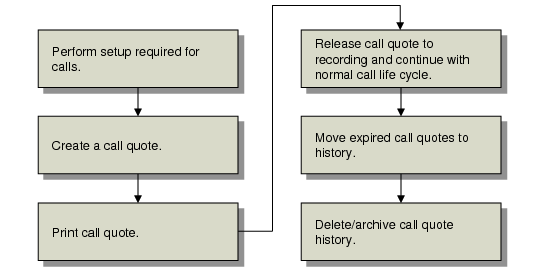
Call Quote Workflow illustrates the life cycle of a call quote.
Call Quote Workflow
The call quote life cycle has the following steps:
1 Because a call quote can become a call, call quotes require the setup normally used for Call Maintenance: end-user information, service BOMs and routings, engineers, status codes, queues, and service types and contracts. Because a call quote’s input process is the same as Call Activity Recording, call quotes need the same setup as Call Activity Recording, including charge codes and charge product lines.
To minimize data entry when creating call quotes, create sets of quote defaults in Call Default Maintenance (11.1.21.10) by setting category to Quote. You can access defaults you created in Call Quote Maintenance.
2 Create quotes in Call Quote Maintenance (11.1.1.7). To simplify data entry for similar repair operations, copy an existing quote in Copy Call Quote (11.1.1.12).
3 Print call quotes using Call Quote Print (11.1.1.10).
4 If the customer accepts the quote and decides to proceed with the repair, use Call Quote Release to Recording (11.1.1.11) to create a call based on the quote. The quote number that initiated the call displays in the Call Info frame of Call Maintenance.
Releasing a quote sets a closed date so it cannot be released again.
5 Use Expired Quote Move to History (11.1.1.22) to move expired or released quotes to a history table and delete them from the call master table.
6 From the history table, you can archive and delete quotes with Call/Quote History Delete/Archive (11.1.1.23).