CAR in the Call Life Cycle
Call Activity Recording is designed to support a wide variety of service contexts. Use it for field engineers who provide preventive maintenance or other services. Use it in a repair depot environment or for telephone support. With CAR, you can set work codes, charge codes, service categories, service types, and invoice sorts in a combination specific to your business.
Primary functions of CAR are:
• Recording parts, labor, and expenses used for a call
• Recording items returned for a call
• Producing invoices from the call data for customer billing
Note: You can also generate invoices in Call Invoice Recording.
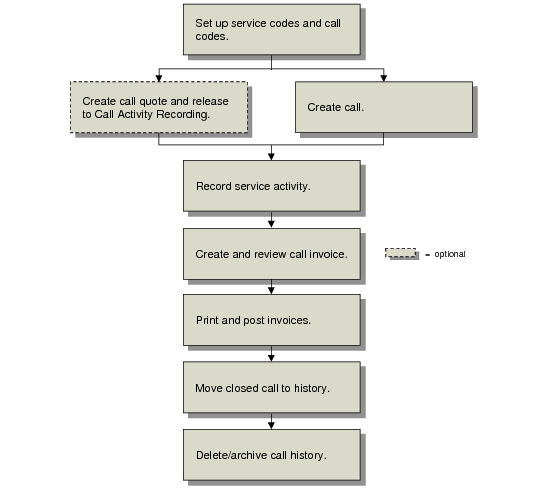
Call Activity Recording in the Call Life Cycle illustrates how Call Activity Recording fits into the call life cycle.
Call Activity Recording in the Call Life Cycle
As shown in
Call Activity Recording in the Call Life Cycle, several activities precede Call Activity Recording and several follow.
1 First, perform service code and call setup. Settings in Call Management Control (11.1.24) affect processing in CAR, in particular the Call Statuses frame and Call Recording/Invoicing frame. See
Service Setup.
2 Create a call in Call Maintenance, or by using a background method for installation calls or PM scheduled calls. Or create a call quote and release it to a call.
3 Record labor, expenses, and items consumed in this call in Call Activity Recording. You can generate the invoice in CAR.
4 If you did not generate the invoice in CAR, generate it in Call Invoice Recording. Review the invoice in summary or detail format. See
Call Invoice Recording for details.
5 Post and print the invoice using Invoice Post and Print (7.13.4).
6 When all work is finished, close the call and move it to history.
7 Periodically delete and archive closed calls to regain space.