How Is CAR Used?
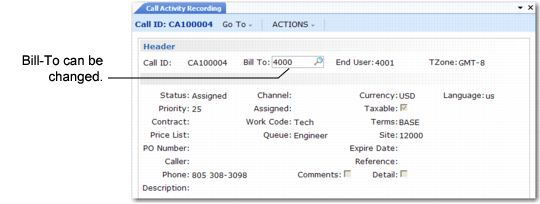
Use Call Activity Recording for calls with an open status. The end user must reference a valid customer unless Call Activity with Temp is Yes in Call Management Control. In this case, you can record a call for the temporary customer. Bill-to defaults from the end user’s customer. You can change the bill-to code in the Call Activity Recording header if you have not generated an invoice for the call. If a pending invoice exists, you cannot change the bill-to.
Sometimes a call remains open for several weeks—for example, during a lengthy installation project. You can generate several reports for the call in Call Activity Recording and invoice them separately.
Changing Bill‑To in Call Activity Recording
The lower frame in
Changing Bill‑To in Call Activity Recording displays information to define the call, such as call priority, status, price list, a description, the assigned engineer, and the first item’s work code. Most fields default from the call and cannot be changed.
In other fields, you enter new information not available in Call Maintenance, such as channel, currency, taxable status and class, terms, site, and detail level.
See
Taxes in SSM for details about how the system applies tax defaults in CAR.