Processing Inventory
Inventory processing in CAR is similar to a backflush operation. You are entering into the system information about labor that you already performed and items and expenses that you already consumed. Therefore, the system assumes you want to issue the inventory when you record it.
When you exit the usage frames, you can view a confirmation frame, illustrated in
Inventory Confirmation Frame, listing the items to be issued and returned. Review the summary information to ensure that the items, sites, and locations are correct.
To make a change, respond No to the prompt. The Item Selection frame displays so that you can proceed through the detailed usage frames and adjust the data.
If you respond Yes at the confirmation frame, the next frame prompts you for an output device. Processing activity generates a report to the output device you specify. This report includes information about items you issued and returned, labor/expense transactions, updates to the installed base, and inventory errors or warnings generated during processing.
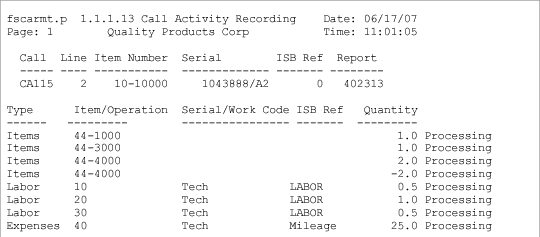
CAR Processing Report shows a sample report.
CAR Processing Report
The report first indicates the call line being processed, then details the items, labor, and expenses for the line. Errors print below the record they refer to.
The various columns include the following information:
• Type is the invoice sort code associated with the transaction.
• Item/Operation is an item number for item issues or the operation number for labor and expense transactions.
• Serial/Work Code displays the serial number for item transactions and the work code for labor and expense transactions.
• Ref displays the ISB reference number for items and the service category for labor and expense transactions.
Inventory in CAR uses the same rules that govern inventory throughout the system. The location status determines the overissue policy. If the system encounters errors while issuing inventory, it sets the report status to hold. To complete the call line, you must correct the errors, set the report status to invoiceable, and reprocess the inventory transactions in CAR.