Call Line Item
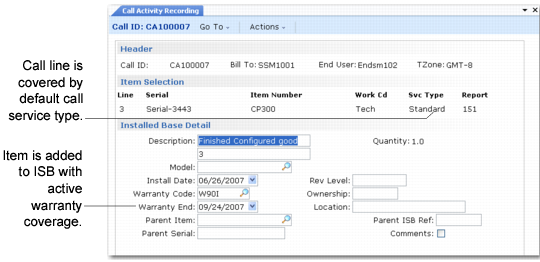
If the call line item is not in the installed base and Update ISB is Yes, a frame appears in CAR for recording installed base information. The system creates the ISB record immediately, so you can update the installed base when you issue inventory items. To add these records as components of the parent item, the record for the parent item must exist.
If you specify active warranty information for the new ISB item, the system prompts you whether you want to apply the coverage to the item.
Adding Item to ISB with Warranty Coverage illustrates the Installed Base Detail frame in Call Activity Recording.
Adding Item to ISB with Warranty Coverage
In this example, the Default Call Service Type in Call Management Control covers the line item. You can add the item to the installed base with warranty coverage if you specify an installation date that is within the warranty date range.
The Installed Base Detail frame displays only when the call line item is not in the installed base and Update ISB is Yes. To modify information for an item in the installed base, use Installed Base Item Maintenance (11.3.1).
Note: Special processing occurs in CAR when the component item you issue is the same item number as the call line. Whether the installed base is updated in this case depends on whether the issue is considered a swap. See
Swaps for details.