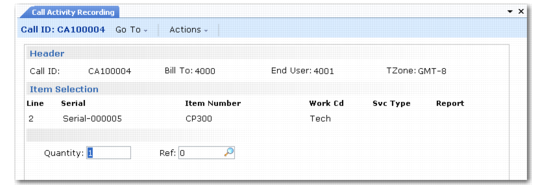
Item Selection Frame
When you leave the first set of frames, the system determines the number of items in the call record’s detail and displays the last line in the Item Selection frame. Use this frame to update existing lines or to add more lines to the call.
When your cursor passes the Item field, the pop-up window shown in
Item Selection Frame displays so you can enter the quantity of the item you are repairing and an optional installed base reference number.
Item Selection Frame
Line
The system increments the line number when you add a new line to the call. When you first access this frame, the last line on the call displays to show how many lines exist.
Serial
Specify the item’s lot or serial number, used to identify installed base records. You cannot update this field after you open a report for the item. If you leave this field blank and the item is defined as lot- or serial-number controlled in Item Master Maintenance, a warning displays. You cannot update the installed base without a lot or serial number.
Item Number
Enter the identifier of an item requiring service activity. Two control program settings affect the validation of this field:
• If Items Must Exist in Service Management Control is Yes, the system checks this field against items in the item master.
• If Items in Installed Base is Yes, the item must exist in the installed base before you can take a call for it.
Quantity
This pop-up displays after you click Next from the Item Number field. Quantity defaults from the call record and indicates the quantity of items you are servicing. For installed base items, Quantity defaults from the quantity in the installed base record. If these two are not the same in CAR, a warning displays. If you are working with serialized items and managing the installed base, create separate lines for each item. You cannot update this field after you open a report for the item.
If you are using service BOMs and routings, the system multiplies the quantity required for each item and each operation run time by the quantity in this field.
Ref
The ISB reference number defaults from the line item; otherwise, it is zero. Reference numbers uniquely identify items in the installed base with the same serial/lot number or items without numbers. You cannot update this field after you open a report for the item.
Work Cd
For a new line, work code defaults from the call header. The value here defaults into the Labor/Expenses and Item Usage frames, indicating the type of work you performed for each labor operation, expense, and item you consumed. If you set up contract limits using work code/service category combinations, this work code determines the applicable limit.
If you define the work code with Fixed Price set to Yes in Work Code Maintenance, Fixed Price in Call Activity Recording is Yes and is display only. The system calculates the service price at the fixed rate regardless of the actual service cost. The system searches the call price list for a price with the fixed price unit of measure in Call Management Control.
Note: When you use fixed prices, the system requires a charge code with Fixed Billable set to Yes.
Svc Type
Defaults from the service type in Call Maintenance for this line. For a new line, the service type defaults first from a warranty or a contract covering this particular item. If the item has no warranty or contract, this field defaults from Default Call Service Type in Call Management Control.
Service types identify terms and conditions of coverage, including response time, price lists, and days of coverage. They define coverage levels and charge codes for covered or over-limit amounts.
If Coverage is Yes in the Item Detail, a pop-up window displays the coverage limits for this service type and the amount you have already consumed.
You cannot update this field after you open a report for the item.
Report
To create a report, enter the new number or clear the existing one for the system to supply one. Use Next/Previous to scroll through reports that exist for the line item. The system-generated number defaults from the next work order lot ID.