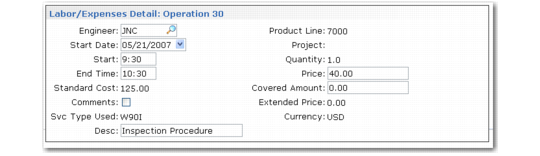
Labor/Expenses Detail Frame
If Detail is Yes in the Labor/Expenses frame, the Labor/Expenses Detail frame appears. The system calculates and displays cost, price, and coverage limit details for the operation. Other fields default from call information or from information in related records.
Labor/Expenses Detail Frame
Engineer
Defaults from the Item Detail frame, which displays the call value. Each operation can have a distinct engineer, if needed.
Start Date
Defaults from the system date, which you can change only the first time through the frame. Start Date is the date when the engineer began the service activity.
Start
Reference field indicating the time of day that the engineer began work.
End Time
Reference field indicating the time when the engineer finished work.
Note: When MTZ is active, these dates and times are relative to the end user’s time zone.
Standard Cost
If this operation has a labor service category, the standard labor cost for the engineer for one hour displays, and cannot be modified. The system calculates the cost from the operation’s work center, either from the service routing or a standard operation. The work center determines the labor rate, labor burden rate, and the labor burden percentage. For labor operations without a work center, the system calculates the cost from the Service Work Center in Call Management Control.
If this operation has an expense service category, the system calculates the cost from the expense cost price list (type E) for the call. The cost of one unit of the service category displays. If no expense cost list exists, expense cost defaults to zero.
Comments
Defaults to Yes if comments exist. Specify Yes to enter or review comments for this operation. The system copies comments into Call Invoice Recording. You can print comments on the invoice.
Svc Type Used
Output-only field displaying the service type that determines this operation’s coverage. The service type that the system uses is not necessarily the one that you specified for the line item. The system can change the service type if you change the charge code. See
Changing Charge Codes.
Description
Specify a brief (maximum 24 character) description of this operation, which defaults from the standard operation or service routing step. This description prints on the invoice if detail is included.
Product Line
Output-only field showing the charge product line for labor costs.
Project
Enter an optional code identifying the GL project for the labor/expense detail. The system associates the project code with the GL transactions it creates. You can track the call’s cost by project.
Whether the field can be updated depends on the setting of Project Code Handling in SSM Accounting Control. If you use a charge code with Project Mandatory set to Yes, you must enter a project code.
Quantity
An output-only field displaying the operation’s labor or expense quantity.
Price
The price for one unit of the operation’s service category. Defaults from the price list on the call header unless this is a fixed price repair. For fixed price repairs, the system sets detail prices to zero, which you cannot change. If no price is found on the price list, the default is zero. To prevent changes, apply field security to Price.
Covered Amount
Amount of the total price for which you are not billing the customer. The system determines this amount from the coverage limits for the contract or service type. The covered amount defaults to zero when:
• No coverage exists on the contract or service type.
• The item has exceeded the contract’s service limits.
• The item has exceeded a list price limit.
• The service is for a fixed price. In this case, covered amount cannot be changed.
Covered amount cannot exceed the price times the quantity.
To prevent changes, apply field security to Covered Amount.
Extended Price
The total price minus the covered amount. For fixed price repairs, this field is zero. The system calculate the extended price as follows:
(Quantity * Price) – Covered Amount
Currency
Output-only field displaying the call currency. Defaults from the call header.
When you finish entering data in this frame and click Next, you return to the Op field. Enter additional data until you record all operations. Click Next to accept the last entries and End to display the Item Usage frame.