Assigning Engineers to End Users
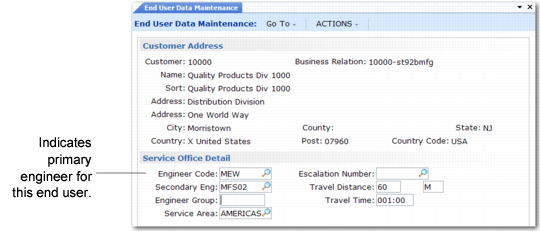
You can associate a primary and secondary engineer with an end user in End User Data Maintenance (11.9.1). In
Service Office Detail Frame, the Engineer Code field defines the end user’s primary engineer.
Service Office Detail Frame
The primary engineer for an end user is given double points by the scheduling process when calls for this end user are created. Define how many points to assign in Engineer Schedule Control. The system gives the secondary engineer the points without doubling them.
When you associate a primary or secondary engineer with an end user, the system checks settings in Engineer Schedule Control. A warning displays if:
• Limit by Service Area is Yes and the engineer’s service area does not match the end user’s area.
• Limit by Time Zone is Yes and the engineer’s time zone either does not match the end user’s or is outside the range in Range of Hours to Consider.
Note: The system checks for time zones only if MTZ is active. See
Multiple Time Zones for details.
After you associate an engineer with an end user, you cannot delete the engineer in Engineer Maintenance. First change the end user’s engineer, then delete the engineer.