Expensed MOs
Expensed MOs are also not attached to a call. Use this method when tracking items expensed as part of the general service activity—usually items you order in lots and store at the workbench or truck. The service engineers do not track any inventory piece by piece. They expense the items once and use them as necessary. A reorder point method typically controls reordering. Also, use this method for items ordered in bulk such as nuts, bolts, screws, washers, lubricants, cleaners, disposable tips, and wipes.
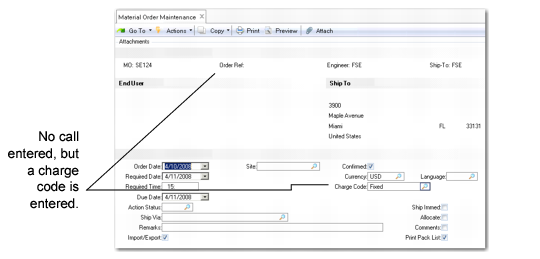
Expensed MOs require a charge code. The system uses the charge code to find a charge product line set up in Charge Product Line Maintenance (11.21.21.5) for this charge code. The system charges the Service Expense account of this product line for the cost of the items.
When you ship an expensed MO, the system transfers inventory to the destination site and location where you issue and consume the items. If this process completes successfully, the system deletes the MO upon completion of shipment. You can review transaction history for transaction details.
When you create an expensed MO, you do not enter a call in the Order Ref field, but you do specify a charge code as shown in
MO Without a Call for Restocking Expensed Supplies.
MO Without a Call for Restocking Expensed Supplies