MO Direct/Pending Returns
Use MO Direct/Pending Returns (11.11.8) for MOs associated with a call to:
• Return items ordered for a call but not used.
• Complete the return of items ordered on an MO for a call and marked with a pending return status in Call Activity Recording.
It is possible to return items ordered for engineer stock—MOs without a call—that you no longer need. However, when all items ship successfully on an MO without a call, the system deletes it. When this occurs and it is necessary to return items, you must use standard inventory management functions to transfer the items.
Note: You cannot return items ordered with an expensed MO. If you specify an MO that has a charge code, the system displays an error.
Return Status
Use the return status in MO Direct/Pending Returns in two ways, depending on whether you are doing a direct return or completing a pending return.
You cannot use MO Direct/Pending Returns to mark items as pending, only to complete a pending return started in Call Activity Recording. This means you can specify a pending return status only if some items are marked as pending in CAR. Otherwise, the system displays an error.
Pending returns are assumed to be good, since they are items you ordered on an MO and did not use. They are returned to the default return site and location set up in Default Site Maintenance.
For direct returns, the system uses the return status to determine the default site and location for the returned items. You cannot specify a return status marked with exchange, since the items being returned do not come from a customer.
Because completing a pending return and directly returning items are processed differently, you cannot execute both types of returns at once.
Example: You want to return four items left on an MO. Two were marked as pending return in CAR. You must execute this function once with a pending status and the quantity pending, then again with another valid return status and the quantity unconsumed.
Return Quantities
The system keeps track of various quantities on the MO. Any kind of return, both direct and pending, updates the quantity returned. A pending return also updates the quantity pending. For this reason, when these quantities display in MO Direct/Pending Returns, the quantity shipped may not equal the quantity returned, plus the quantity consumed, plus the quantity pending.
If both an open quantity and a quantity marked pending exists, the system defaults the value into the quantity field based on the return status.
MO Direct/Pending Returns Header
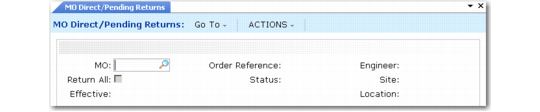
MO Direct/Pending Returns (11.11.8) illustrates the header frame of MO Direct/Pending Returns.
MO Direct/Pending Returns (11.11.8)
MO
Enter a valid MO with items to be returned. The MO cannot have a charge code.
Order Reference and Engineer
These are output-only fields that default from the MO.
Return All
Specifying Yes sets up all open quantities on the MO to be returned. If No, you must enter each line on the MO and select quantities to be returned before they are processed. Specify Yes to streamline data entry.
Status
Status defaults from the Return Status in Call Management Control. The definition of the return status determines what kind of return you are performing and the default return site and location.
Enter any valid return status defined with Return Status Maintenance (11.21.17) except an exchange status. Pending returns have a Qty Pending value greater than zero. If a pending status is specified, some items must be marked as a pending return in Call Activity Recording or an error displays.
Site and Location
Site and location default first from the engineer site and location, then from the engineer’s area. You can change these values if the items reside in a different site and location. These values provide the default for each line with quantities to be returned.
Effective
Enter the GL effective date for the return transaction. The default is the current date. The system verifies that the date is within an open fiscal period.
The effective date determines when this transaction affects GL balances.
Selecting Items to Return
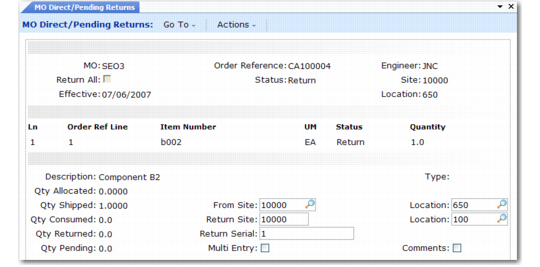
Once you complete the header, the line-item selection frames display.
MO Direct/ Pending Returns (11.11.8)
The Ln, Order Ref Line, Item Number, and UM fields are output only and reflect values from the MO line.
Status
Defaults from the header’s status and has the same restrictions and effect.
Quantity
If a pending status is specified, the Qty Pending displays by default. For a direct return, the open quantity on the MO line displays. Enter the number of these items you want to return. If you specify more than the open or pending quantity, an error displays. The open quantity is the Qty Shipped minus the Qty Consumed minus Qty Returned.
Description, Type, Qty Allocated, Qty Shipped, Qty Consumed, Qty Returned, and Qty Pending are output-only fields.
From Site and Location
Site and location default from the header. The system transfers inventory from this site and location to the return site and location.
Return Site and Location
The system searches for a default return site and location based on the attributes of the return status. Define return sites with Default Site Maintenance (11.21.13) for combinations of product line, service group, work code, item, and area. The return location must allow receipts (RCT-TR).
The system searches for a return site using the product line and service group of the item being returned. The system derives the area from the engineer. Work code is not used in this function.
Return Serial
If the item being returned is lot/serial controlled, enter the correct number in this field.
Multi Entry
Enter Yes if you are returning multiple items and need to specify detail information for each one. If Yes, a Return Detail frame displays so that you can specify the lot/serial of each item returned.
Comments
If Comments is Yes, you can add or modify comments for the return.