RMA Service Types
The service type associated with an RMA determines credit pricing and coverage levels, as well as other coverage details. By default, an RMA uses the service type from one of three sources:
• The service type of the call associated with the RMA
• The service type of a contract selected to cover the RMA
• The default service type in RMA/RTS Control (11.7.24), if no call or contract are associated with the RMA
Service types determine the financial impact of RMA processing. They provide default credit price lists for RMA receipts, default restocking charges, and also determine the percentage of coverage. In addition, the service type determines whether you can ship a replacement item before you receive the defective item, and can determine the default product line.
See
Contract and Warranty Types for details on setting up service types.
Credit Price List
During returns, an RMA credit price list must exist before the system can calculate the credit price. If no credit price list exists, the system sets the line item price of a receipt to zero. Define RMA credit price lists in the PO/Sched/RMA Rcpt Pricing Menu (1.10.2).
Product Line
RMA Maintenance supports an expanded use of product lines to determine accounting impacts. Support organizations use this to distinguish the financial impacts of service provided under different kinds of coverage: warranty, contract, giveaway, billable.
The default product line for RMAs depends on the setting of Use Item Prod Line in SSM Accounting Control. If this is Yes, the item’s product line is the default. If No, the product line of the service type is the default. The product line determines which GL accounts are affected by an RMA.
The system uses the product line for the RMA line to determine sales‑related accounts in the same way as sales orders. In RMAs, the system determines COGS accounts in the same manner. The system first looks for accounts set up with Sales Account Maintenance (1.2.17), using the product line associated with the RMA line item, the RMA header’s site and channel, and the customer type of the sold-to address. If no matching records exist, the system uses the accounts in Product Line Maintenance.
Note: Inventory accounts for RMA transactions are based on the product line associated with the item being issued or returned in Item Master Maintenance. This is essential to inventory control implementation, since the same source for GL account numbers must be used for issuing and receiving items to reconcile inventory value with GL account balances.
Issue Line Percentage of Coverage
For RMA issue lines, line item discount reflects the level of coverage of the service type in effect for the RMA. The system supplies a default for this field in the following manner:
1 First, the system determines the service category associated with the line item. You can specify this with Service Item Maintenance (11.3.7). Otherwise, the system uses the item service category from Call Management Control.
2 If a contract is associated with the RMA, the system searches the contract header limits for a coverage percentage in the following order.
• Search for a coverage percent defined for the invoice sort related to the item’s service category.
• Search for a coverage percent defined for the contract total limit.
3 If contract or contract header limits are not found, search the service type specified on the RMA in the same order: first by invoice sort, then total.
4 Add the service coverage percent to any discount calculated by the best pricing algorithms and display the results in the line item Discount field.
Note: The system uses the order-line due date when it searches for effective coverage level records.
The system displays the amount of discount that results from service coverage and the amount that results from a price list discount.
Coverage Examples
An RMA obtains coverage in three ways: from a call, a contract, or the control program. The following examples illustrate each method of coverage.
RMAs with a Call
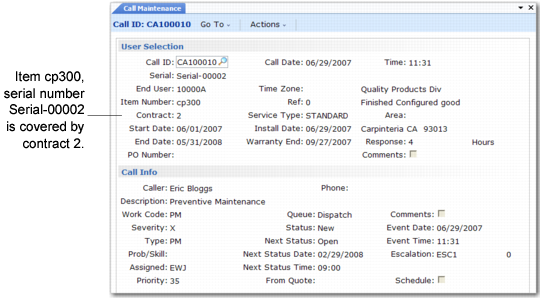
When an RMA references a call, the system uses the call’s coverage. In
Call Maintenance (11.1.1.1), a call is taken for an item covered under contract 2.
Call Maintenance (11.1.1.1)
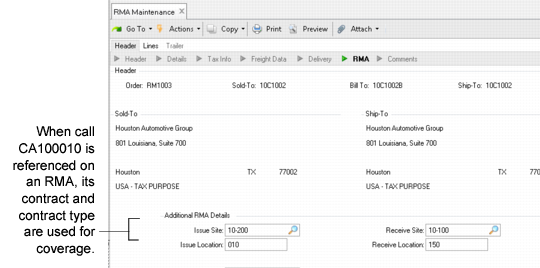
If you create an RMA referencing this call, the system uses the contract and service type from the call for the RMA.
RMA Maintenance (11.7.1.1)
In this example, call CA100010 was taken for a contract item.
Call Maintenance (11.1.1.1) shows that Call Maintenance determines the contract (2) as well as the service type associated with that contract (Standard). When call CA100010 is specified in the RMA Maintenance, the system uses contract 2 and service type Standard as defaults to determine the level of coverage.
RMAs with a Contract
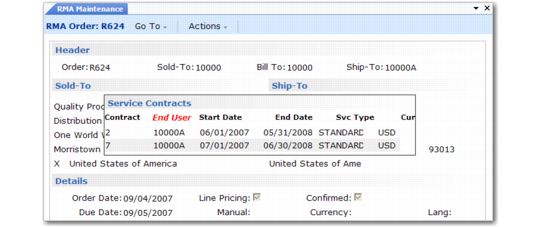
Since RMAs do not have to refer to a call, the system has other ways to determine coverage levels. One of these is by selecting from a list of active contracts for the end user. The system displays the Service Contract pop-up window depending on the Display Service Contracts setting in RMA/RTS Control. If this field is Yes, a pop-up window showing all valid or open contracts for the end user displays after you complete the upper frame of RMA Maintenance.
Coverage for an RMA Without a Call
RMAs Without Call or Contract
If an RMA does not reference a call and no contracts exist for the end user or a contract is not selected, the system uses the service type for the Default RMA Contract field in RMA/RTS Control. All items added to the RMA receive the level of coverage of this service type, unless you use the charge type feature.