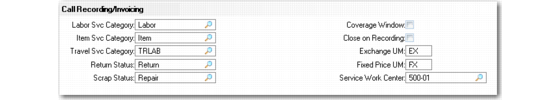
Call Recording/Invoicing Frame
The next frame in Call Management Control contains settings that affect recording service activity and invoicing.
Call Recording/ Invoicing Frame (11.1.24) displays the Call Recording /Invoicing frame.
Call Recording/ Invoicing Frame (11.1.24)
Labor Svc Category
This value is the default in the labor/expense detail of Call Activity Recording if no other value exists. It also provides the default for standard operations and routing steps. You can change the value during any CAR session. Define service categories with Service Category Maintenance (11.21.9). One of the labor or expense fields for the service category must be Yes.
Item Svc Category
This value is the default in the item detail of Call Activity Recording if no other value exists. You can also define a service category for each service item in Service Item Maintenance (11.3.7). Define service categories with Service Category Maintenance (11.21.9). One of the item fields for the service category must be Yes.
Travel Svc Category
This value is the default for consuming labor for travel time on a visit in Call Activity Recording if no other value exists.
Return Status
Sets the default status for returned items in Call Activity Recording if that item is defined as repairable with Service Item Maintenance (11.3.7). Also sets the default return status in MO Direct/Pending Returns (11.11.8). First define the status in Return Status Maintenance (11.21.17).
Scrap Status
Sets the default status for returned items in Call Activity Recording if that item is not defined as repairable with Service Item Maintenance (11.3.7). First define the status in Return Status Maintenance (11.21.17).
Note: You cannot use a status with Pending set to Yes.
Exchange UM
Defines the unit of measure for Service Pricing Maintenance (11.17.1) when you define repair price lists for exchanges in Call Activity Recording. When you use a return status with Exchange set to Yes in Call Activity Recording, the system searches the call price list for a price with this UM. If a price is found, it displays as the default price for the exchange credit.
Fixed Price UM
Defines the unit of measure for Service Pricing Maintenance when you define a repair price list for fixed price service in Call Activity Recording. When you use a work code with Fixed Price set to Yes in Call Activity Recording, the system searches the call price list for a price with this UM and displays it as the default fixed price. The end user is invoiced this amount, regardless of the cost of service.
Coverage Window
This value determines the default for the Coverage field of the Call Item frame of Call Maintenance and the Item Detail frame of Call Activity Recording. If Coverage is Yes, a frame displays showing coverage information such as contract number, contract service type, start and end dates, active service type, warranty service type, and install date. Levels and limits of coverage also display; for contracts, information about limit consumption is included. Set this field to Yes to enable service personnel to more easily analyze the billing impact of proposed service activity.
Close on Recording
Determines how the system normally changes call statuses Call Activity Recording. If Close on Recording is No, the system attempts to set the call status to complete when you finish recording service activity. If the call cannot be completed, its status is unchanged.
If Yes, the system attempts to close the call by setting its status to the closed status in the control program. If all conditions for call closure are not met—for example, there are open MOs, reports on hold, invalid line statuses—the system attempts to set the call status to complete so that invoicing can take place.
Service Work Center
Enter a work center defined with Service Work Center Maintenance (11.19.13) or standard Work Center Maintenance (14.5). Used in the Call Activity Recording Labor/Expense frame to supply the cost of labor if a routing or standard operation is not used.