Defining Program Information
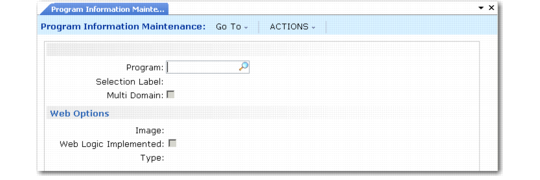
The program information table contains a record for each standard menu-level program, defining characteristics that affect the way it runs. Each standard program in the .NET UI must have a record both in Menu System Maintenance and in Program Information Maintenance (36.3.21.1).
Note: Component activities are defined in Menu System Maintenance, but not in Program Information Maintenance.
In addition to menu-level programs, lookups must be defined in order for the lookup icon to display next to a field in an HTML screen.
Program information records are loaded with other default data during system installation and can be viewed in Program Information Maintenance or Program Information Browse (36.4.4.14). You must manually create records for any custom programs that you want users to be able to access as HTML programs from the .NET UI. Otherwise, they will open in Terminal mode.
Note: Terminal mode lets you run programs with a character-mode UI, using a telnet session. The system must be configured to support telnet sessions for the program to display. See
Setting User Telnet Options for details on defining telnet settings.
The following table lists the default settings for different program types.
Default Display Settings in .NET UI
|
Program Type
|
Web Logic Implemented
|
Type
|
|
Browses, lookups
|
Selected
|
Blank
|
|
Special HTML programs such as Browse Maintenance and Kanban workbenches
|
Selected
|
Blank
|
|
HTML reports and inquiries
|
Clear
|
Desktop
|
|
HTML maintenance programs
|
Clear
|
Desktop
|
|
Terminal-mode utilities
|
Clear
|
Blank
|
The Multi Domain field indicates a standard program that updates data that applies to all domains in a database. When this is selected:
• In the .NET UI, the string All Domains displays in the Menu Properties window for the associated menu program. Otherwise, the domain name displays.
• In the character UI, the string All Domains displays in the menu title bar when Header Display Mode is set to 2 or 3 in Security Control (36.3.24).
Appropriate default settings for the Multi Domain field are set during installation. For example, generalized codes apply to each domain separately so Multi Domain is not selected by default for mgcodemt.p. Country code data applies to the database as a whole so Multi Domain is selected by default for adctrymt.p.
Important: You can update the setting for your custom programs or change it if you want the current working domain to continue to display even when a user is updating a table that applies across domains. This change affects what displays on the UI only. The program continues to update data for all domains.
Adding Records
To execute a program with an HTML display from the .NET UI menus, add a record to Program Information Maintenance for each custom program. When a record does not exist for a program, the system assumes that it should run in Terminal mode.
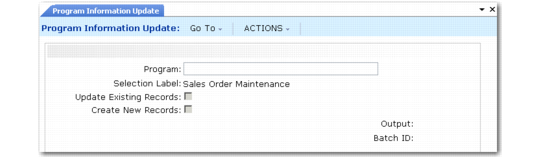
If you want to create records for a number of programs at once, use Program Information Update (36.4.4.15) to scan them and automatically create records.
Program Information Maintenance (36.4.4.13)
To create program information records:
1 Enter a custom program name.
2 Indicate if this program updates data for all domains in the database.
3 Click Next to continue.
4 Select the Web Logic Implemented check box if this is a browse written according to QAD standards. Clear the Web Logic Implemented check box if this is a maintenance program, report, or inquiry that you want to display in HTML.
5 Leave the Type field blank for a browse. Specify Desktop for an HTML maintenance program, report, or inquiry.
Program Information Update
Use Program Information Update to automatically add records for custom programs to Program Information Maintenance. Use this utility as an alternative to adding records manually. It is especially useful for initially populating records with referenced tables.
Program Information Update (36.4.4.14)