Logon History Archive/Delete
Use Logon History Archive/Delete (36.23.3) to delete and archive login history records when online history is no longer needed.
The system does not automatically delete historical information at period or year end. You can delete this information as frequently or infrequently as you prefer. How often you should run this function depends on how long you need to retain historical information in your database. Most companies keep historical data for at least one year or longer, depending on availability of disk space.
You should run this function twice. First, run it with Delete set to No and review the report. Then, run it with Delete set to Yes.
When you set Delete to Yes, login history records that satisfy the selection criteria are deleted from the database. If you set Archive to Yes, deleted data are copied to an ASCII file that can be reloaded using Archive File Reload. Otherwise, deleted data cannot be recovered.
Important: You cannot set Archive to Yes when Delete is No.
When Archive is Yes, selected data is stored in a file named uslhYYMMDD.hst, where uslh is the record type and YYMMDD is the file creation date. If this file does not exist in the system, it is created. If it does exist because you already ran delete/archive the same day, the system adds the additional archived records to the end of the file.
Since the generated file has no internal label or content description, you should keep a record of the file name and contents, in case you need to reload the data. Also, remember that you cannot selectively reload data from archive files. If an archive file contains data for an entire year and you need to access records for one month, you must reload all the data in the file to access the records you need.
Important: Date and time in the stored data are formatted based on the country code associated with the user who archived the data. If a user with a different date and time format reloads the data, load errors and corrupted data can occur.
To avoid these problems, use the same settings when archiving and reloading the data. Before loading data, use User Maintenance to temporarily change your country code to match that of the user who archived the data.
You should define menu security for this program to restrict access.
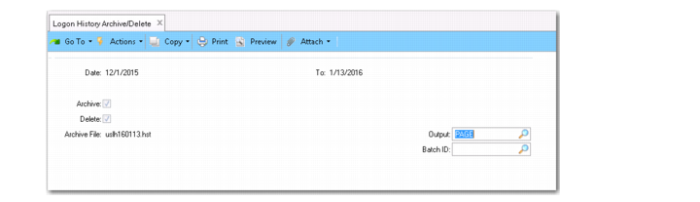
Logon History Archive/Delete (36.23.3)
Date
Enter a range of log on dates to select history records to delete or archive.
Archive
Indicate whether to archive the selected records.
No: The selected records are not copied to an ASCII file.
Yes: The selected records are copied to an ASCII file. The system creates a file name in the following format: xxYYMMDD.hst, where xx identifies the module code or record type and YYMMDD is the file creation date. If this file does not exist, it is created. If it does exist, records are appended to the end.
Delete
Indicate whether to delete the selected records or generate a report only.
No: The selected records are not deleted. A report is generated listing the selected records.
Yes: The selected records are deleted from your database and listed in a report.
If you set Archive to Yes when Delete is Yes, the selected records are copied to an ASCII file before deletion. Use Archive File Reload to reload the data, if needed. See
Restoring Archive Files.
Restoring Archive Files
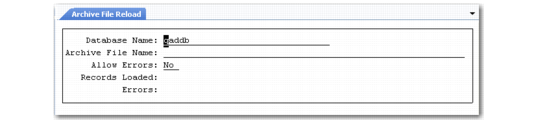
Use Archive File Reload (36.16.5) to reload an archive file after restoring the file from backup media to the system disk.
Archive File Reload (36.16.5)
The reload process puts data from the archive file back into the database exactly as it was when you deleted it. However, if base data has changed, you may encounter errors.
Example: You are reloading accounts receivable history for a customer that has been deleted.
Select Allow Errors to continue processing when errors occur. The system lists load errors in a .e file located in the directory you ran the process from.
Important: Date and time in the stored data are formatted based on the country code associated with the user who archived the data. If a user with a different date and time format reloads the data, load errors and corrupted data can occur.
To avoid these problems, use the same user settings when archiving and reloading the data. Before loading data, use User Maintenance (36.3.1) to temporarily change your country code to match that of the user who archived the data. For more information on User Maintenance, see
QAD Security and Controls User Guide.