Multiple Time Zone Load Utility
Use the Multiple Time Zone Load Utility (36.16.22.13) to load your own set of time zone data.
QAD’s default time zone data is loaded automatically during the installation process. You need only use the Multiple Time Zone Load Utility if you want to load your own time zone data. QAD’s default time zone data is located in the $QAD_EE_INST_DIR/db/mfg directory.
After you load your time zone data, verify that the time zones are valid and appropriate for your business practices. Use Multiple Time Zones Report (36.16.22.2) or Inquiry (36.16.22.3) to review definitions and ensure they conform to your requirements. Each organization is responsible for maintaining and updating time zone data to correspond to changing realities and business requirements.
If needed, you can delete existing time zone data and reload your time zone data.
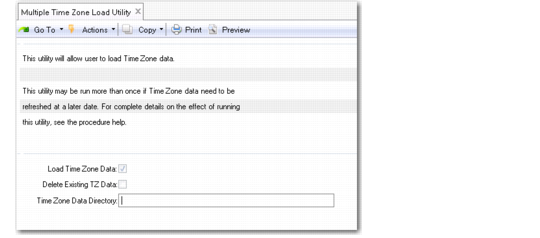
Multiple Time Zone Load Utility (36.16.22.13) illustrates the Multiple Time Zone Load Utility.
Multiple Time Zone Load Utility (36.16.22.13)
Load Time Zone Data
Select this field to indicate that you want the system to load your own time zone data.
After loading, verify that the time zones are valid and appropriate for your business. Use Multiple Time Zone Report or Inquiry to ensure the definitions conform to your requirements.
Delete Existing TZ Data
The system considers this field only when Load Time Zone Data is selected. If you are loading time zone data, you can also delete current time zone definitions. Use this feature if you want to reinitialize the sample data.
Time Zone Data Directory
Specify the directory from which to load the time zone data.
If you select the Load Time Zone Data field, this field is mandatory and cannot be blank.
Setting a Default Time Zone
The Use User’s Time Zone for Default Domain field in Database Control (36.24.1) affects the time stamping of transactions you create in your default domain. See
Database Control.
Important: If you are using the optional Service/Support Management module and the Multiple Time Zone option is activated in Service Management Control (11.24) for any domain in the database, you should not activate the Use User’s Time Zone for Default Domain field.