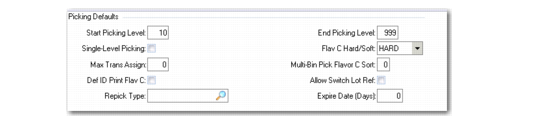
Picking Defaults
Warehouse Maintenance, Picking illustrates the Picking frame in Warehouse Maintenance.
Warehouse Maintenance, Picking
The fields in this frame define which storage location groups the system should use for picking inventory. Each SLG has a picking level defined. Any SLG with a picking level that is not between the Start and End levels you specify here is not considered for picking by the picking algorithms in this warehouse.
Start Picking Level
Enter the numerical code for the picking level at which picking is to start. The picking algorithms do not consider any storage location group with a picking level below that value.
End Picking Level
Enter the numerical code for the picking level at which picking is to end. The picking algorithms do not consider any storage location group with a picking level above that value.
Note: Start and end picking levels are useful to restrict picking to one storage location group. You can define the start and end picking levels for a given transaction type within Warehouse Transaction Type Maintenance (4.7.5). See
Storage Location Group Maintenance.
Single-Level Picking
Enter Yes if all the picking quantity must be taken from only one picking level; otherwise, enter No.
Flavor C Hard/Soft Assignment
Indicate how transactions for the multi-bin pickup process are managed:
Hard: Tasks are reserved for a given person and cannot be exchanged with another one.
Soft: Tasks are reserved for a given person but can be exchanged with another one.
Max Trans Assign
Enter the maximum number of transactions for a multi-bin process where the multiple transactions have a common destination. The maximum number of transactions assigned indicates how many transactions the system reserves for such a process.
Multi-Bin Pick Flavor C Sort
The Sort Code indicates the criteria for grouping transactions for a multi-bin pickup process. The minimum requirement is to have a common destination.
0 | Sort by order and destination location |
1 | Sort by ship-to and destination location |
2 | Sort by destination location |
Allow Switch Lot Ref
Enter Yes to activate the switch lot/serial and reference functionality by warehouse and internal routing.
Setting this field to Yes lets you use QAD Warehousing and RF functionality to specify a different pallet or reference other than the one the system selected to fill an order.
Default ID Print Flavor C
Specify the default value for the Print ID field that appears at the confirmation of a multi-bin pickup movement.
Repick Type
Specify the transaction type that should be used if a repick is required. The entry you make here defaults to internal routings you set up in this warehouse.
It is possible when confirming an inventory transaction, if allowed by the quantity change fields described above, to confirm a quantity picked less than the quantity expected. In this case, warehouse staff can set a field at confirmation to allow a repick of the missing items. For the repick, the system uses an internal routing and a picking algorithm for the transaction type you specify in the Repick Type field.
Note: This repick transaction type must start with PICK-, and must be defined in Transaction Type Maintenance (4.7.1). If you leave the Repick Type field blank, the repick uses the same transaction type as the original picking.
Expire Date (Days)
Enter the maximum number of days (0 to 9999) that the expiration date of the new pallet or lot/serial number can differ from the expiration date of the original pallet or lot/serial number. For example, if you enter 5, and the expiration date of the original pallet is 12/1/2008, then the expiration date of the new pallet must fall between 12/1/2008 and 12/6/2008. The default value for this field is 0.
Note: If you enter 0 (zero), then the expiration date of the original pallet or lot/serial number must match the expiration date of the new pallet.