Pick Options
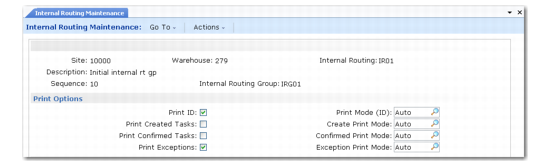
The Print Options frame shown in
Internal Routing Maintenance, Print Options contains fields where you define the picking options that are performed for this sequence step in the internal routing.
Internal Routing Maintenance, Print Options
Repick Type
Specify the transaction type that should be used if a repick is required. The entry you make here defaults to internal routings you set up in this warehouse.
It is possible when confirming an inventory transaction, if allowed by the quantity change fields described above, to confirm a quantity picked less than the quantity expected. In this case, warehouse staff can set a field at confirmation to allow a repick of the missing items. For the repick, the system uses an internal routing and a picking algorithm for the transaction type you specify in the Repick Type field.
Note: This repick transaction type must start with “PICK-” and must be defined in Transaction Type Maintenance (4.7.1). If you leave the Repick Type field blank, the repick uses the same transaction type as the original picking.
Allow Switch Lot Ref
Enter Yes to activate the switch lot/serial and reference functionality by warehouse and internal routing.
Setting this field to Yes lets you use QAD Warehousing and RF functionality to specify a pallet or reference other than the one the system selected to fill an order.
Expire Date (Days)
Enter the maximum number of days (0 to 9999) that the expiration date of the new pallet or lot/serial number can differ from the expiration date of the original pallet or lot/serial number. For example, if you enter 5, and the expiration date of the original pallet is 12/1/2008, then the expiration date of the new pallet must fall between 12/1/2008 and 12/6/2008. The default value for this field is 0.
Note: If you enter 0 (zero), then the expiration date of the original pallet or lot/serial number must match the expiration date of the new pallet.