About Optimized Storage
You can specify optimized storage separately for the warehouse and for individual storage location groups within the warehouse. You can, therefore, have different combinations of optimized storage settings at warehouse and SLG level.
Note: You normally want to minimize the number of put-away transactions, which requires the No setting for optimized storage at both levels. Only when your warehouse is very full do you want to use optimized storage, so that the system tries to find locations to put away the inventory by examining the available space within each available location, without regard for the number of put-away transactions.
At the SLG level, the Optimized field determines whether the system sorts locations within the SLG in ascending or descending capacity, when looking for locations in which to put away stock.
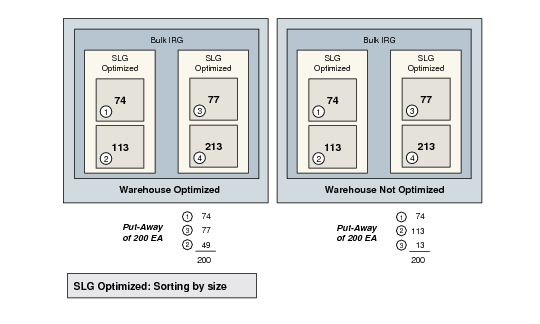
If the warehouse is optimized, the order in which the system selects SLG locations is as follows:
• First, the non-optimized SLGs and locations that have the highest capacity
• Second, the optimized SLGs and locations that have the least capacity
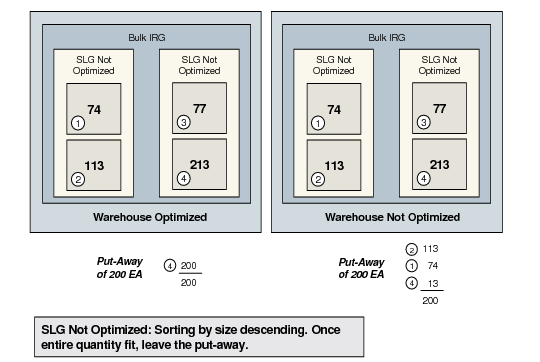
If the warehouse is not optimized, the system considers the SLGs in the order specified in the storage location group list sequences. Within each SLG, the system looks for locations as follows:
• If the SLG is optimized, the system looks for the location with the smallest capacity.
• If the SLG is not optimized, the system looks for the location with the highest capacity.
Non-optimized storage location groups offer a large performance advantage. The system sorts the location with the highest capacity first, which reduces the number of movements that must be made in the warehouse, and terminates the program as soon as a suitable location has been found for all the inventory. If the warehouse is also non-optimized, the put-away program could end with the first SLG to be considered, without having to consider the other SLGs in the list. However, if the warehouse is optimized, the system must consider all the locations in order to sort them.
How Optimization Works
The way in which optimization is carried out depends on the combination of warehouse and SLG optimization. There are four possible combinations.
Optimization 1
Optimization 2
There is a trade-off between optimization and the performance of QAD Warehousing. The more optimized locations in a warehouse, the slower the system runs. Conversely, the lower the optimization, the faster the system runs.
When the system is first set up and stock levels are low, you usually have no need for optimization. It is only as the number of locations and stock levels grows that optimization is useful.
A general recommendation for a balance of locations to performance is 500 SLGs/locations in a warehouse.
The following table compares how the different combinations of optimization affect three different benchmarks of system performance. The benchmarks are:
1 Number of transactions
2 Stock levels
3 System performance
| Warehouse Optimized | Warehouse Not Optimized |
SLG Optimized | Good | 2 | 2 |
Medium | | 3 |
Poor | 3, 1 | 1 |
SLG Not Optimized | Good | 1 | 3 |
Medium | | 1 |
Poor | 2, 3 | 2 |
How to Optimize a Warehouse
Use Warehouse Maintenance (4.1.1) to set the
Optimized Storage field to Yes.
In Storage Location Group Maintenance (4.3.1), set the
Optimized Storage field to Yes. To optimize a group of SLGs, first enter the name of an SLG list in the Storage Loc Group field.
Note: You can optimize both warehouse and storage location groups; or optimize the warehouse but not the storage location groups; or optimize the storage location groups but not the warehouse.