QAD 2017 Enterprise Edition
>
User Guides
>
Warehousing
>
Defining Location Groups
>
Storage Location Group List Maintenance
Storage Location Group List Maintenance
To control which storage location groups the system uses to put away particular items, you can specify a particular SLG for the item using Item-Warehouse Maintenance (4.4.11). If you have more than one SLG in which you might want to store the item, you can alternatively specify a list of SLGs. These lists specify the order in which you want the system to consider them for put-away of the item. You set up these SLG lists using Storage Location Group List Maintenance (4.3.5).
Note: The system also considers the setting of the optimized field when considering the list of SLGs. See
About Optimized Storage for details.
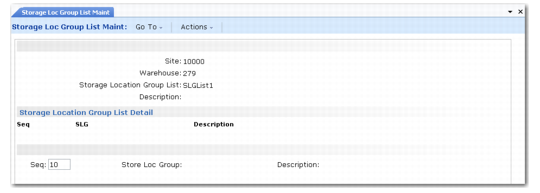
Storage Location Group List Maintenance (4.3.5) is shown in
Storage Location Group List Maintenance (4.3.5).
Storage Location Group List Maintenance (4.3.5)
Enter values in the following fields:
Site
Enter the name of the existing site.
Warehouse
Enter the name of the existing warehouse in which you want to maintain storage location group lists.
Storage Location Group List
To modify the fields for an existing storage location group list, enter the name of the existing list.
To create a new SLG list, enter the name of the list.
Description
Enter a description of the SLG list.
Click Next to accept these entries and move to the list detail frame.
Seq
Enter a sequence number. You can specify one storage location group for each sequence number. The lowest sequence number is the first SLG that the system tries to use for put-away of the item.
SLG
Enter the name of the SLG for this sequence number.
Description
This field displays the description associated with the SLG. You cannot edit the description.