QAD 2017 Enterprise Edition
>
User Guides
>
Warehousing
>
Defining Items
>
Defining Item Data for Storage Location Groups
Defining Item Data for Storage Location Groups
In addition to defining data for items at the warehouse level, you can also use Item-Storage Location Group Maintenance (4.4.1) to specify warehousing fields for items related to a specific storage location group; see
Item-Storage Location Group Maintenance (4.4.1).
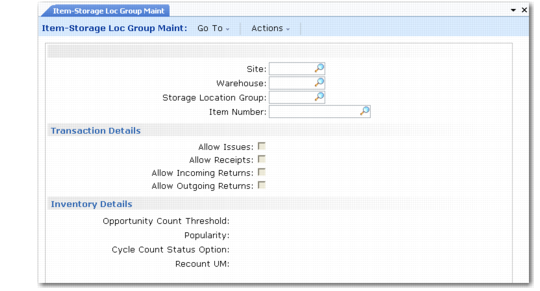
In the header, enter the site, warehouse, SLG, and item number, then click Next. The system displays the Transaction Details and Inventory Details frames.
Item-Storage Location Group Maintenance (4.4.1)
Transaction Details
The Transaction Details fields show the settings for this storage location group. If you want to modify these settings for this item only, you can modify the field values in this frame.
Allow Issues
This field controls whether inventory can be issued out of the system from locations in this SLG. Generally, you limit issues to specially designated areas, such as Goods-Out. Enter Yes if this item can be issued; otherwise, enter No.
Allow Receipts
This field controls whether inventory can be received from outside the system into locations in this SLG. Generally, you limit receipts to specially designated areas, such as Goods-In. Enter Yes if this item can be received; otherwise, enter No.
Allow Incoming Returns
This field controls whether inventory can be received into locations in this SLG as part of a returned issue. Generally, you limit incoming returns to specially designated areas, such as Goods-Out Returns or Rejects. Enter Yes if this item, when returned from a customer, can be placed in locations in this SLG; otherwise, enter No.
Allow Outgoing Returns
This field controls whether inventory can be issued from locations in this SLG as part of a returned receipt. Generally, you limit outgoing returns to specially designated areas, such as Goods-In Returns or Rejects. Enter Yes if quantities of this item to be returned to a supplier can be issued from locations in this SLG; otherwise, enter No.
Note: If Allow Receipts is set to Yes in a bulk storage location group, for example, the system lets you make a direct receipt into these locations without generating any transactions.
Inventory Details
Opportunity Count Threshold
You can set the OPC Threshold for the item for the whole warehouse using Item-Warehouse Maintenance, but you can also enter a value in this field to apply only to this item in this SLG. See
OPC Threshold.
Popularity
You can set the Popularity for the item for the whole warehouse using Item-Warehouse Maintenance, but you can also enter a value in this field to apply only to this item in this SLG. See
Popularity.
Cycle Count Status Option
Enter a number to define the action that should be performed on the inventory status upon confirmation of a recount or in-tolerance count in this storage location group. This field defaults from Warehouse Maintenance. The options are as follows:
0 | No status change. |
1 | Change to Location Status: The status of the inventory is changed to the default inventory status of the location. |
2 | Status change based on Fail Status: The status of the inventory is changed to the good status associated with the current fail status specified in Warehouse Management Data frame in Inventory Status Maintenance (1.1.1). The frame displays only when QAD Warehousing is active. |
Recount UM
This field is especially useful when you use CIM load with Cycle Count Entry (3.14) to load stock in the system.
When the Use Recount UM of SLG field is set to Yes in Warehouse Maintenance (4.1.1), the system gives any pallet recounted in Cycle Count Entry the alternate UM defined in the recount UM of the corresponding item-storage location group, if any.