Replenishment
The following topics describe how QAD Warehousing handles the replenishment process for a warehouse:
Defining ReplenishmentDefines the replenishment process and explains how and why it is used.
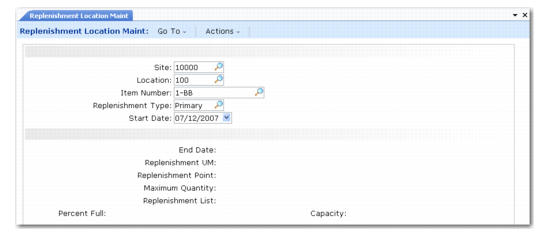
Linking Replenishment Lists to ItemsDescribes how to link replenishment lists to locations/items or storage location groups/items using either Replenishment Location Maintenance (4.16.5) or Replenishment SLG Maintenance (5.16.9).
Replenishment RequestDescribes how to use Replenishment Request (4.16.13).
RF Real-Time Replenishment RequestExplains how to setup and execute RF Kanban Scan (1.5) and the prerequisites.
RF Overpick Replenishment and Put AwayDescribes how to use RF devices to replenish locations.
Defining Replenishment
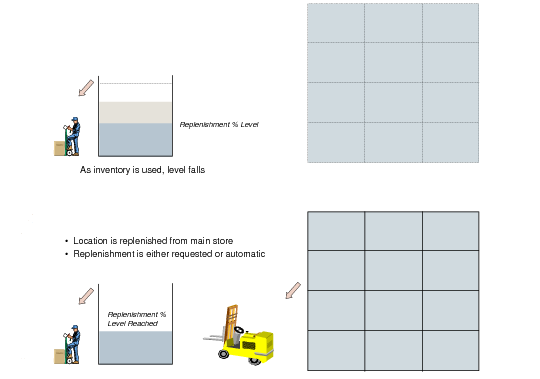
QAD Warehousing lets you define areas in the warehouse where the main picking activity occurs. In order for this area to be maintained at the optimum stock levels, the system uses a process called replenishment. The area in which stock is stored prior to picking is generally called the primary picking area. This area would typically contain the stock required for picking first and in quantities and locations that are easy to maintain.
You define the types of items and the quantities that can be stored in the replenishment, or primary picking, locations. Picking functions look in these locations first before searching the rest of the warehouse.
Diagram of Replenishment
Using the put-away algorithms and storage techniques, you can divide the stock into areas each consisting of common units of storage.
Example: You can have an area holding pallets, one holding cartons, and one holding piece quantities. The carton locations are stocked from split pallets, and the piece locations from the carton area. This is performed by the replenishment functionality. Using this process optimizes the picking process and creates areas of the warehouse where fork-lift trucks can operate, and areas where people can walk and gather stock.
Note: You can still mix pallets and pieces in the same location, if you want to.
Using warehouse features, you can define:
• Replenishment for a given item and a given location.
• Replenishment for a given item in a storage location group. This means that a put-away is performed in the storage location group in order to place the items at the best suitable location inside this storage location group.
• Replenishment lists. A series of storage location groups in which the system looks for the item to replenish. Sequences allow searching some storage location groups first and then others by order corresponding to the sequence.
• Replenishment in real-time on the RF.
• Overpick Replenishment. Warehouse staff can select a multi- or single-item pallet from the reserve area and replenish one or multiple locations from the pallet in the picking area. After staff replenish, they can return the remainder on the pallet to the reserve area.
You define a list using Replenishment List Maintenance (4.16.1), shown in
Replenishment List Maintenance (4.16.5).
Replenishment List Maintenance (4.16.5)
The following examples illustrate types of replenishment lists that you can set up.
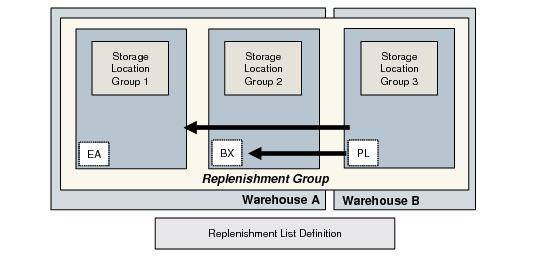
First Sample Replenishment List
Replenishment list definition:
Warehouse | Storage Location Group | Sequence |
Warehouse A | Group 2 | 20 |
Warehouse B | Group 3 | 30 |
This means that whenever storage location group 1 must be replenished, the system first looks in storage location group 3. If the item is available, it is replenished according to the picking definition associated with the storage location group.
If the item is not available in this storage location group, then the system looks in storage location group 2, which can be in another warehouse, as shown in
First Sample Replenishment List.
If storage location group 2 must be replenished from storage location 3, you would define the replenishment list as shown in the following table:
Warehouse | Storage Location Group | Sequence |
Warehouse B | Group 3 | 20 |
The second replenishment list example is shown in
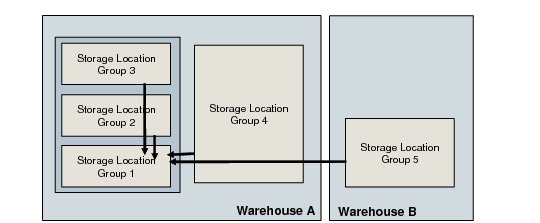
Second Sample Replenishment List.
Second Sample Replenishment List
In this second example, storage location group 1 is replenished from storage location groups 2, 3, 4, and 5. Storage location group 2 can be replenished from storage location groups 1,3,4,5, and so on. To match this example and define the replenishment for storage location group 1, you would have to define the following replenishment list:
Warehouse | Storage Location Group | Sequence |
Warehouse A | Group 2 | 20 |
Warehouse A | Group 3 | 30 |
Warehouse A | Group 4 | 40 |
Warehouse B | Group 5 | 50 |
At the item/storage location group level, you must define the replenishment list to use in order to replenish the item from storage location group 1.
For storage location group 2, you would define the following replenishment list, attached in the item/storage location group record in the Replenishment List field.
Replenishment list definition:
Warehouse | Storage Location Group | Sequence |
Warehouse A | Group 1 | 20 |
Warehouse A | Group 3 | 30 |
Warehouse A | Group 4 | 40 |
Warehouse B | Group 5 | 50 |