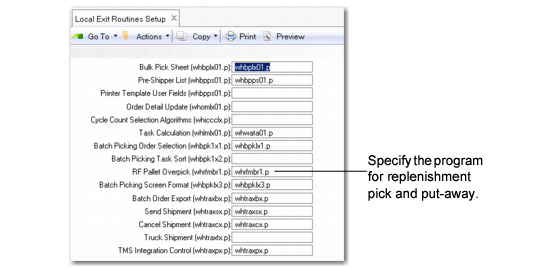
Defining the Replenishment Overpick Program
You specify the correct program in the RF Pallet Overpick (whrfmbr1.p)
field in
Local Exit Routine Setup (4.23.10). The
whfmbr1.p program is included with the system and used by default. If you do not specify a program in this field, the standard replenishment program is used for the RF Next Task/Select Task option.
Local Exit Routines Setup (4.23.10)
RF Pallet Overpick (whrfmbr1.p)
Specify the overpick program that runs during replenishment so that warehouse staff can pick the exact required amount, overpick to fill bins, and return items that are not picked.
When you specify the whrfmbr1.p default program, the system resets Allow Split Replen in Wave Planning Control (4.15.1.24) to Yes. This forces the pallet to be splittable, and the system can create a task for the exact quantity required.
Example: 12 EA are needed on a pallet of 100 EA. The system creates a task for 12 EA. The whrfmbr1.p overpick replenishment program lets the user know that 12 EA is the required quantity, but the user puts away as much as can fit into the bin, regardless of the required amount.
If the pallet is not splittable, then overpicking depends on the setting of the
Replenishment OverPick field in Wave Planning Control (4.15.1.24). If set to Yes, the system creates a task to pick for the entire pallet of 100 EA. This does not indicate the exact quantity required nor the amount that would fill the bin.