Defining Workload Groups
A workload group is a collection of work location groups (WLGs). You use Workload Group Maintenance (4.15.1.9) to define a workload group and assign it to a warehouse and site. When the system uses workload calculations, it takes into account all workload groups you define in Workload Group Maintenance for the site and warehouse to which it applies the calculations.
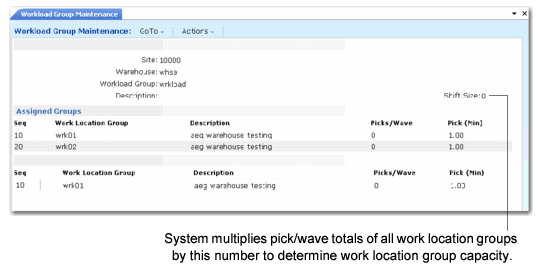
Workload Group Maintenance displays the shift size at the workload group level. The shift size indicates the number by which the system multiplies the capacity of all WLGs.
In Wave Selection (4.15.3), the system displays the capacity and workload for all workload groups.
Workload Group Maintenance (4.15.1.9)
Site
Enter the site for the workload group.
Warehouse
Enter the warehouse for the workload group.
Workload Group
Specify the workload group for this site and warehouse.
Description
Enter a brief description (maximum 24 characters) of the the workload group.
Shift Size
Enter the number of warehouse staff in a shift when you create a new workload group. The system uses this value to determine the capacity of all WLGs.
Example: You have a capacity of 64 picks/wave per person; therefore, for a shift of two people that work in that workload group, the total capacity is 128 picks/wave.
Seq
Enter a sequence number identifying the work location group within this workload group. Sequence numbers must be unique within a workload group. The system prints work location group sequence numbers in ascending sequence. For example, work location group 20 follows work location group 10.
Number sequences by 10s or 100s, so you can add new work location groups without renumbering existing ones. For example, if you have work location group 10, 20, and 30 and need to add another work location group after 20, you can enter it as work location group 25.
Work Location Group
Enter the name of the work location group for this sequence of the workload. The system displays the description that you previously specified.
Picks/Wave
Enter the quantity that indicates the number of picks per wave per person.
Picks (Min)
Enter the number of minutes per pick. The default value for this field is define defined in the
Time per Pick (Min) field in Wave Planning Control. See
Time per Pick (Min).