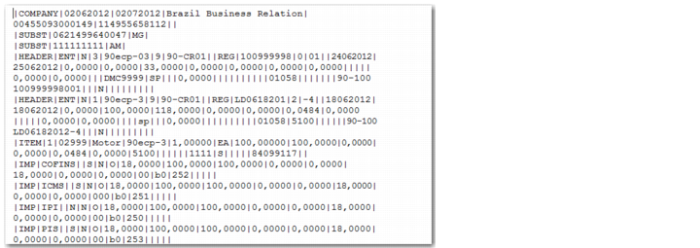
Sequence | Field Name | Description |
1 | REG | Displays the fixed value COMPANY. |
2 | DT_INI | The first date specified in the selection criteria. |
3 | DT_FIN | The last date specified in the selection criteria. |
4 | NOME | The company name as defined in the Business Relation record. |
5 | CNPJ | The federal tax ID. |
6 | IE | The state tax ID. |
7 | CUST | Customizable field. |
Sequence | Field Name | Description |
1 | REG | Displays the fixed value SUBST. |
2 | IE_SUBS | The state tax ID for business relation address types of Substitution, which are used to link a company address with the state tax ID and tax zone. In QAD EE, a tax zone can only have one state tax ID specified. However, in Brazil, where substitution tax applies, multiple IDs may be required in cases where a company is issuing goods or services to multiple states, and each state has its own tax ID. |
3 | UF_ST | The state code for business relation address types of Substitution. |
Sequence | Field Name | Description |
1 | REG | Displays the fixed value HEADER. |
2 | IND_OPER | Displays the fixed value ENT for inbound transactions or SAI for outbound transactions. |
IND_EMIT | Displays the value S for notas fiscais issued by your company and N for notas fiscais not issued by your company. | |
4 | ESP_DOC | The type of transaction, which is taken from the Legal Document Type field. For outbound transactions, if the Legal Document Type field is blank, NF is sent. If it is a Credit Note, NC is always sent. |
5 | TP_OP | The operation type, which is taken from the nota fiscal tax usage. |
6 | IND_PAGTO | The payment type, which can be: • 0: Cash • 1: Staged payment • 9: Without payment |
7 | COD_PART | The nota fiscal ship-from. |
8 | COD_MOD | The nota fiscal model, which is the template type for imported electronic notas fiscais. |
9 | COD_SIT | The nota fiscal situation code. The options are: • REG: Regular (used for inbound transactions) • AUT: Authorized • CAN: Cancelled • REJ: Rejected • COMP: Complementary |
10 | NUM | The nota fiscal number. |
11 | SER | The nota fiscal series number. |
12 | SSER | The nota fiscal subseries. |
13 | CHV_NFE | The nota fiscal access key. |
14 | DT_DOC | The date on which the nota fiscal was issued. |
15 | D_E_S | The date on which the nota fiscal was received. |
16 | VL_DOC | The total value of services transactions on the nota fiscal. |
17 | VL_MERC | The total value of goods transactions on the nota fiscal. |
18 | VL_TOTNF | The total value of the nota fiscal. |
19 | VL_TOTDIS | The total value of unconditional discounts deducted from the total. |
20 | VL_TOTFRE | The total value of freight charges for the nota fiscal. |
21 | VL_TOTSEC | The total value of insurance charges for the nota fiscal. |
22 | VL_TOTEXP | The total value of other expenses for the nota fiscal. |
23 | IE_SUBS | The substitution state tax ID. |
24 | NUM_ORIG | The original nota fiscal number. |
25 | SER_ORIG | The original nota fiscal series number. |
26 | DT_ORIG | The original nota fiscal issue date. |
27 | PS_BRUTO | The gross weight of the goods. |
28 | PS_LIQ | The net weight of the goods. |
29 | TRANS | The mode of transport for the goods. |
30 | COD_TRANS | The code for the carrier that transported the goods. |
31 | ID VEICULO | The ID of the vehicle that transported the goods. |
32 | UFID VEICULO | The state in which the vehicle is registered. |
33 | MOD_FRE | The mode of transport for the goods. |
34 | ESP_VOL | The volume measure for the goods transported. |
35 | QTD_VOL | The quantity of goods transported. |
36 | IND_DOC | The export document type. |
37 | NR_DE | The export declaration number. The export declaration is the document that initiates the export customs clearance. |
38 | DT_DE | The date on which the export declaration was created. |
39 | NAT_DE | The export nature, which can be 0 for direct export or 1 for indirect export. |
40 | NRO_RE | The export registration number. The export registration provides the information necessary for customs to examine and authorize the export. |
41 | DT_RE | The export registration date. |
42 | CHC_EMD | The shipment acknowledgement number. |
43 | DT_AVB | The annotation date. The annotation is the final act in the export process and constitutes confirmation by customs of the goods. |
44 | TP_CHC | The loading bill type specified in Legal Document Export Details. |
45 | PAIS | The destination country for the goods. |
46 | CONTA | The GL account used for the nota fiscal. |
47 | SUB_CONTA | The sub-account used for the nota fiscal. |
48 | CCUSTO | The cost center used for the nota fiscal. |
49 | CUST | Customizable field. |
50 | NRO_DI | The import declaration number specified in Fiscal Receiving. |
51 | DT_DI | The import declaration date specified in Fiscal Receiving. |
52 | NRO_AR | The bill of lading number recorded in Fiscal Receiving. |
53 | TP_DOC_IMP | The import declaration type. The options are: 0: Import declaration 1: Simplified import declaration |
54 | NUM_ATO_DRB | The drawback authorization number recorded during the export process. |
55 | COMPL_EXP | Complementary export data. |
56 | DT_CONHEC | The bill of lading date. |
57 | NRO_MEMO | The memorandum number. |
58 | NUM_ORIG_EXP_IND | The original nota fiscal number. This field will always be blank. |
59 | SSER_ORIG_EXP_IND | The original nota fiscal subseries number. This field will always be blank. |
60 | SER_ORIG_EXP_IND | The original nota fiscal series number. This field will always be blank. |
61 | COD_PART_EXP_IND | The partner code related to the original nota fiscal number. This field will always be blank. |
62 | DT_E_EXP_IND | The original entrance date for the nota fiscal. This field will always be blank. |
63 | EMIS_CTG | Indicates if the nota fiscal was sent to SEFAZ using a contingency mode. |
Sequence | Field Name | Description |
1 | REG | Displays the fixed value DESC. |
2 | COD_CMT | The nota fiscal comment code. |
3 | DOC_CMT | The comments recorded on the nota fiscal. |
Sequence | Field Name | Description |
1 | REG | Displays the fixed value ITEM. |
2 | NUM_ITEM | The nota fiscal line number relating to the goods. |
3 | COD_ITEM | The item code for the goods. |
4 | DESC_COMP | The complementary description for the item. |
5 | COD_NAT | The operation type, which is taken from the tax usage code on the transaction. |
6 | QTDE | The quantity of the item. |
7 | UM | The unit of measure for the item. |
8 | VL_UNIT | The price per unit for the item. |
9 | VL_TOTAL | The total value of the line. |
10 | VL_DESC | The value of any discounts applied to the order. |
11 | VL_FRE | The freight charges for the item. |
12 | VL_SEC | The security value of the item. |
13 | VL_EXP | Other expenses that apply for the item. |
14 | CONTA | The GL account used for the item order. |
15 | SUB_CONTA | The sub-account used for the item order. |
16 | CCUSTO | The cost center used for the item order. |
17 | NF_ORIGEM | The nota fiscal number for the item. |
18 | SER_ORIGEM | The nota fiscal serial number for the item. |
19 | DT_ORIGEM | The date on which the nota fiscal for the item was issued. |
20 | CFOP | Numeric code that identifies the nature of the operation for the movement of goods and services from interstate and inter-site transportation. A customized program is available for calculating CFOP codes. See Customized CFOP Code Calculation for details. |
21 | MOV_EST | Indicates if the items are from stock. The code is N for memo items and S for non-memo items. For inbound transactions, see the documentation on the Physical Movement field in Issuing and Receiving a Nota Fiscal Using Fiscal Receiving. Note: The Physical Movement field only applies from QAD 2013 Enterprise Edition. |
22 | IND_FRT | Displays the freight type indicator. |
23 | COMENT | The comments recorded for the item. These are limited to 255 characters. |
24 | CUSTOM | Customizable field. |
25 | PROJECT_CODE | Displays the project code. |
Sequence | Field Name | Description |
1 | REG | Displays the fixed value IMP. |
2 | COD_IMP_LF | The tax type of the transaction. |
3 | COD_REC | The tax collection code. This field is always blank for this extract and is updated by the fiscal partner during processing. |
4 | TAX_IN | Indicates if the transaction includes tax. The possible values are: O: Outros/Others I: Tributável/Taxable In order to correctly calculate the value for this field, you must create a tax box for each of the two possible values and link the appropriate tax box to the customer group for the tax rate. See User Guide: QAD Global Tax Management for more information on tax boxes and tax groups. |
5 | TAX_RET | Indicates if retained tax applies for the transaction. |
6 | NON_TAX | Indicates if the transaction is non taxable. |
7 | PERC_IMP | The percentage tax applied. |
8 | RED_IMP | The percentage of recoverable tax. |
9 | TAX_BASE | The base amount subject to tax. |
10 | NON_TAX_BASE | The non-taxable base amount. |
11 | RED_TAX_BASE | The base tax reduction amount. |
12 | TOT_TAX | The tax amount. |
13 | NON_REC_TAX | The non-recoverable tax amount. |
14 | RET_TAX | The withholding tax amount. |
15 | CST_TAX | The tributary situation code that identifies the tax policy for the goods. |
16 | METH | The tax calculation method used. |
17 | COD_IMP | The tax code that applies for the transaction. |
18 | COD_BC | The calculation basis, which is recorded in the Tax Reason field for the associated tax rate record. |
19 | COMENT | Any comments recorded for the tax line. These are limited to 255 characters. |
20 | CUST | Customizable field. |
Sequence | Field Name | Description |
1 | REG | Displays the fixed value TIT. |
2 | PARCELA | The installation sequence. |
3 | VL_TIT | The original value of the customer or supplier invoice. |
4 | VL_BRUT | The customer or supplier invoice amount. |
5 | DT_VENC | The customer or supplier invoice due date. |
6 | NUM_INIT | The reference code for the invoice. |
7 | IND_EMIT | Indicates if the legal document is issued. |
8 | IND_TIT | The invoice type. |
9 | CUST | Customizable field. |
Sequence | Field Name | Description |
1 | REG | Displays the fixed value PART. |
2 | COD_EST | The code that identifies the customer, supplier, or carrier. |
3 | NOME | The name of the customer, supplier, or carrier. |
4 | CNPJ | The federal tax ID of the customer, supplier, or carrier. |
5 | UF | The state in which the partner is registered for tax. |
6 | IE | The state tax ID of the customer, supplier, or carrier. |
7 | COD_MUN | The municipal code designation from the Instituto Brasileiro de Geografia e Estatística. This code is recorded in the City Code field of the Business Relation record. |
8 | IM | The municipal tax ID. |
9 | SUFRAMA | The suframa ID. |
10 | END_1 | The first line of the partner’s address. |
11 | END_2 | The second line of the partner’s address. |
12 | END_3 | The third line of the partner’s address. |
13 | MUN | The city associated with the partner’s address. |
14 | CEP | The zip code associated with the partner’s address. |
15 | COD_PAIS | The country code associated with the partner’s address. |
16 | CUST | Customizable field. |
17 | RelationShipCode | The business relationship code is sent when the generalized code exists. |
Sequence | Field Name | Description |
1 | REG | Displays the fixed value UM. |
2 | UNID | The unit of measure code. |
3 | DESCR | A description of the unit of measure. |
4 | CUST | Customizable field. |
Sequence | Field Name | Description |
1 | REG | Displays the fixed value PROD. |
2 | COD_ITEM | The item code. |
3 | DESCR_ITEM | A description of the item. |
4 | UNID_INV | The item unit of measure. |
5 | TIPO_ITEM | The item type. |
6 | COM_NCM | The item fiscal class. |
7 | EX_IPI | The exception code for IPI taxation. |
8 | COD_GEN | The item type code, which is taken from the first two characters of the fiscal class. |
9 | COD_LIST | The service code for the item. |
10 | NAT_FRT | The freight nature indicator code for the item. |
11 | COD_ORIG | Indicates the origin of the goods. |
12 | CUST | Customizable field. |
Sequence | Field Name | Description |
1 | REG | Displays the fixed value CONV. |
2 | UM | The stocktaking unit. |
3 | UNID_CONV | The conversion unit code. |
4 | FAT_CONV | The conversion factor for the unit of measure. |
5 | CUST | Customizable field. |
Sequence | Field Name | Description |
1 | REG | Displays the fixed value PLANO. |
2 | COD_NAT_CCCOD | The type of GL account: • Asset • Liability • Income • Expense |
3 | IND_CTA | Indicates the type of account. |
4 | NIVEL | The analysis type for the account. |
5 | COD_CTA | The account code. |
6 | COD_SUB | The sub-account code linked to the account. |
7 | C_CUST | The cost center code linked to the account. |
8 | NOME_CTE | The name of the account. |
9 | COD_CTA_REF | The chart of account reference. |
10 | CUST | Customizable field. |
11 | ModifiedDate | The cost center modified date. |
Sequence | Field Name | Description |
1 | REG | Displays the fixed value CCUSTO. |
2 | COD_CCUS | The cost center code. |
3 | CCUS | The cost center description. |
4 | CUST | Customizable field. |
5 | ModifiedDate | The cost center modified date. |
Sequence | Field Name | Description |
1 | REG | Displays the fixed value OPER. |
2 | COD_NAT | The tax usage code associated with the transaction. |
3 | DESCR_NAT | The tax usage description. |
4 | SERV | Indicates whether or not the tax usage is used for services transactions. |
5 | OP_TYPE | The operation type associated with the tax usage. See page here for a list of operation types. |
6 | CFOP_COMPL | The complement of the document for printing Código Fiscal de Operações e Prestações (CFOP) tax and registration tax details on the books. |
7 | COMENT | Comments on the tax transaction. |
8 | CUST | Customizable field. |
Sequence | Field Name | Description |
1 | REG | Displays the fixed value INVENT. |
2 | COD_ITEM | The code that identifies the item. |
3 | UNID | The unit of measure for the item. |
4 | QTY | The item quantity. |
5 | VL_UNT | The cost per unit of the item. |
6 | VL_ITEM | The total cost of the item. |
8 | IND_PROP | Indicates ownership of the item. Displays 0 for periodic costing inventory. 0: The item is the property of the company submitting the extract 1: The item is the property of the company, but is on a third-party site 2: The item is the property of a third party, but is on the site of the company submitting the extract |
12 | COD_PART | This field is always blank. |
13 | TXT_COMPL | A complementary description of the item. |
14 | COD_CTA | The account code associated with the item. |
Sequence | Field Name | Description |
1 | REG | Displays the fixed value TIT-REAL. |
2 | DOCTYPE | The document type. |
3 | NF | The NF number. |
4 | Serial | The NF serial code. |
5 | CNPJ | The federal tax ID. |
6 | Stage | The stage number. |
7 | Pay_date | The payment date. |
8 | Pay_amt | The payment amount. |
9 | Inv-nbr | The invoice number. |
10 | Pay-ref | The payment reference. |
Sequence | Field Name | Description |
1 | REG | Displays the fixed value IMP-RT. |
2 | TAX_LG | The tax legal group the tax type belongs to. |
3 | Tax_Code | The tax code in Tax Rate Maintenance. |
4 | Tax_Rate | The tax rate in Tax Rate Maintenance. |
5 | WHT_AMT | The calculated amount of the withholding tax. |
6 | TIT-REAL | The column base amount. |
Sequence | Field Name | Description |
1 | REG | Displays the fixed value FINAL. |
2 | TOT | The total of all lines in the file. |