Topic | Reference |
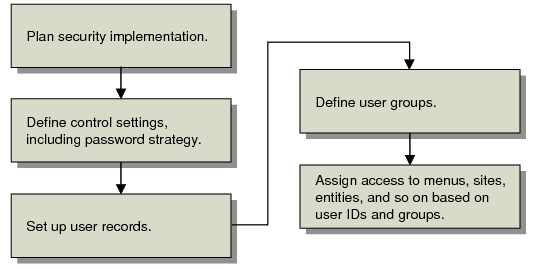
Review all information security documentation for both QAD and Progress prior to installation (or software upgrade if applicable). | • This chapter • Installation Guide • Progress documents, including Data Administration, Guide, Client Deployment Guide, and Programming Handbook |
Review all QAD-related files to determine the appropriate permission and ownership settings. | |
Document the users who should be permitted access to the application and verify user IDs. | |
Determine if user groups will be used, and if so document the group names and the user IDs to be assigned to each group. | |
Consider requirements for policies and/or procedures regarding deactivation of old user accounts. To meet the requirements of many regulated environments, user accounts can be deactivated, but not deleted, once they have been used to access the system. | |
Define policies and procedures to be used to assure that user and group membership information will be kept current. | |
Determine procedures to be used to create new user accounts and communicate initial passwords (e-mail, personal contact, other). | |
Decide if a simplified access approach is sufficient. This lets users log in based on operating system-level security. | |
Define how often users are required to changed passwords, and update the corresponding security setting. | |
Define procedures for failed log-ins, including: • The number of failed attempts before an event notification should be communicated to the defined security administrators • Alternatives to e-mail notification • Reviews of system logs • Procedures for resetting locked accounts | |
Define password policies and procedures, including password composition, length, expiration, and reuse of previous passwords. | |
Define appropriate policies and procedures for users requiring that sessions be locked using a screen saver or comparable mechanism whenever the user leaves the session unattended. |
Topic | Reference |
Determine whether to implement Progress as well as QAD user ID and password controls. | |
Determine requirements for Progress-level schema security to control access to database tables. | |
Consider disallowing Progress-level table and field access for the blank user ID | |
Determine the period of inactivity after which a session should be disabled. For each device used to access the system, assure that a screen saver, or comparable utility, is set to activate after the defined period of activity, requiring reentry of the user’s password to unlock the session. | |
Determine whether multiple users share a common workstation to access the system and whether appropriate operating system functionality exists to adequately support security. | Operating system documentation |
Topic | Reference |
Verify and update relevant control program settings, especially those for security. | |
Review any currently defined users and groups and disable any inappropriate, inaccurate, or out-of-date entries. | |
Define users designated as security administrators, who will receive e-mail notification of security events such as failed log-ins exceeding a defined threshold. | |
Update security settings regarding user IDs and passwords, including: • Password composition • Password length • Password expiration • Limits on re-use of previous passwords • Limits on number of failed logon attempts | |
Determine how security functions should be implemented to protect the integrity of database records. For each menu item, site, GL account, and so on, specify the appropriate users or groups authorized to execute the menu program or access data. | |
Review menu function authorizations for potential segregation of duty issues and adjust groups as appropriate. |
Number | Description | Program |
36.3.1 | User Maintenance | mgurmt.p |
36.3.2 | User Inquiry | mguriq.p |
36.3.3 | User Password Maintenance | mgurmtp.p |
36.3.4 | User Group Maintenance | mgurgpmt.p |
36.3.5 | User Group Inquiry | mgurgpiq.p |
36.3.9 | GL Account Security Maintenance | mgacsmt.p |
36.3.10 | Menu Security Maintenance | mgpwmt.p |
36.3.11 | Menu Security Change | mgpwcg.p |
36.3.13 | Entity Security Maintenance | glsecmt.p |
36.3.14 | Entity Security Inquiry | glseciq.p |
36.3.15 | Site Security Maintenance | clsismt.p |
36.3.17 | Inventory Movement Code Security | sosimt.p |
36.3.18 | Inv Mvmt Code Security Browse | gpbr502.p |
36.3.19 | Field Security Maintenance | mgflpwmt.p |
36.3.20 | Field Security by Group | mgflgpmt.p |
36.3.22 | User Access by Application Inquiry | lvusriq.p |
36.3.23 | Reports and Utilities Menu | |
36.3.23.1 | Logon Attempt Report | mgurpsrp.p |
36.3.23.2 | User Account Status Report | mguactrp.p |
36.3.23.4 | User Group Report | mgurgprp.p |
36.3.23.12 | User Password Force Change Util | utfrcpsw.p |
36.3.23.13 | Entity Security Report | glsecrp.p |
36.3.23.15 | Site Security Report | clsisrp.p |
36.3.23.16 | GL Account Security Report | mgacsrp.p |
36.3.23.19 | Activated Field Security Report | mgflpwrp.p |
36.3.23.20 | Dictionary Field Security Report | mgfldcrp.p |
36.3.24 | Security Control | mgurpmmt.p |