Set Registry Editor
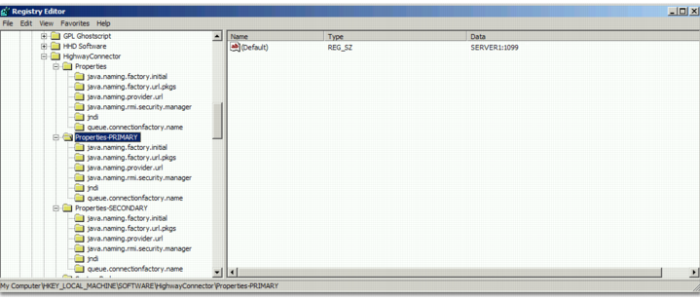
When you install the Web UI, it creates a registry entry that specifies the port for the listeners to use. It is located at HighwayConnector|Properties|java.naming.provider.url. This entry displays the port and the machine to connect to; for example, SERVER1:1099.
However, if you are in a clustered environment, connection details are needed for each JBoss node, so that the listeners can make a connection to all servers on the cluster. For example, in an environment with two JBoss nodes, there are two sets of properties in Registry Editor: Properties-PRIMARY and Properties-SECONDARY, as displayed in
Server Properties in Registry Editor. Properties-PRIMARY refers to the JBoss node that starts up first.
Server Properties in Registry Editor
You must edit each java.naming.provider.url entry to point the URL to the standard JNDI port and the correct machine name; for example, the entries SERVER1:1099 and SERVER2:1099 point to two JBoss servers in a cluster.