ACU
This section provides information on responses.
OverviewExplains the steps involved in configuring ACU.
PSL FTP ServerExplains how to set up the FTP server to support ACU.
PrerequisitesDescribes what information you need before beginning configuration.
ConstantsDescribes values that are hard-coded into the progress upload routine.
Highway ConfigurationDescribes the Highway configuration for ACU.
Highway Listener ConfigurationDescribes the Highway listener configuration for ACU.
TestingInforms you which package to use for testing.
Important System ValuesLists system values that you need to configure ACU.
Overview
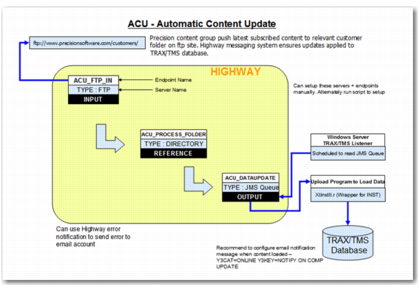
You can configure your system to enable Highway to load compliance updates automatically. This process is known as ACU. To perform this operation:
1 Pool an FTP server.
2 Save the compliance message in a local folder.
3 Send a message containing the file name and its full path to a JMS queue.
The file containing the compliance update is then uploaded into PRECISION. An overview of the full process is displayed in
ACU Automatic Content Update Flow.
ACU Automatic Content Update Flow