Pegging Requirement Detail
When noncumulative and cumulative schedules are being processed, requirement detail can be maintained throughout the process. During shipment, shipper lines that are tied to specific requirements are consumed. This process is known as pegging.
Pegging occurs automatically in:
• Picklist/Pre-Shipper–Automatic (7.9.1)
• Pre-Shipper/Shipper Workbench (7.9.2)
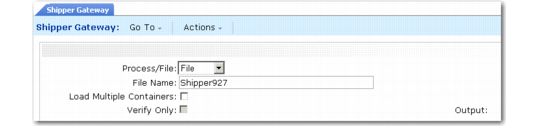
• Shipper Gateway (7.9.22)
For a cumulative schedule, you can disable automatic pegging in these three shipper programs by setting Automatic Cum Pegging to No in Container/Shipper Control (7.9.24) or Customer Schedules Control (7.3.24).
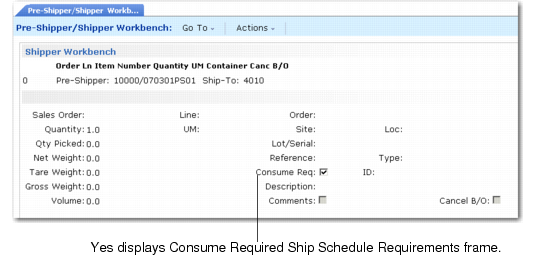
When you set Automatic Cum Pegging to No, the Consume Req field defaults to No in Pre-Shipper/Shipper Workbench (7.9.2).
Shipper Gateway
Pegging occurs during execution of Shipper Gateway, which uses an external ASCII file in the designated format to create shippers.
Shipper Gateway (7.9.22)
The relationship between required ship schedule lines and individual shipper lines is maintained by Shipper Gateway. As shipper lines are created and pegged, the requirement is consumed.
You can disable automatic pegging for a cumulative schedule if pegging detail is not needed.
Shipper Gateway generates a report that displays information related to pegged requirements, including requirement detail authorization numbers (Kanban).
Picklist/Pre-Shipper–Automatic
Use Picklist/Pre-Shipper–Automatic (7.9.1) to create and peg shipper lines based on the active RSS for the appropriate requirement. This program creates the shipper, adds items to it, and pegs shipper lines.
The relationship between required ship schedule (RSS) lines and individual ship lines is maintained during the shipment staging list process. As shipper lines are created and pegged, the requirement is consumed.
You can disable automatic pegging for a cumulative schedule.
The report generated at completion displays information regarding the pegged requirement, including requirement detail authorization numbers. The pegged shipper lines can be viewed and maintained in Pre-Shipper/Shipper Workbench.
When a shipper with authorization numbers is created and pegged using Picklist/Pre-Shipper–Automatic, the authorization numbers are assigned to shipper lines based on a FIFO method. You cannot designate which authorization numbers are assigned to individual shipper lines.
Pre-Shipper/Shipper Workbench
You can manually maintain the relationship between required ship schedule (RSS) requirements and individual shipper lines in Pre-Shipper/Shipper Workbench (7.9.2).
To maintain pegged shipper lines in Pre-Shipper/Shipper Workbench, set Consume Req to Yes to display the Consume Required Ship Schedule Requirements frame.
Pre-Shipper/ Shipper Workbench (7.9.2), Consume Req Field
The Consume Required Ship Schedule Requirements frame displays, showing the RSS requirements for the scheduled order line number.
Note: For a cumulative schedule, you can disable automatic pegging by setting Automatic Cum Pegging to No in Container/Shipper Control (7.9.24) or Customer Schedules Control (7.3.24). When you set Automatic Cum Pegging to No, Consume Req defaults to No.
You can modify the Ship Line Peg Qty as needed. The system adjusts the Open Qty based on the pegged quantity you enter.
Open quantity for the requirement is calculated based on:
1 The Ship Complete percentage in the Customer Scheduled Order Maintenance. See
Ship Complete.
2 The RSS requirement quantity tied to this shipper line.
3 The amount pegged (the quantity placed in Ship Line Peg Qty).
4 Dynamic Unpeg in Customer Scheduled Order Maintenance. See
Dynamic UnPeg.