Enter Item Data
In the Item Data menu (1.4), item data is split into four categories that roughly parallel how companies divide the responsibility for maintaining item data:
General engineering data: Item Master Maintenance (1.4.1), Item Data Maintenance (1.4.3)
Inventory data: Item Inventory Data Maintenance (1.4.5), Item Site Inventory Data Maintenance (1.4.16)
Planning data: Item Planning Maintenance (1.4.7), Item Site Planning Maintenance (1.4.17)
Cost data: Item Cost Maintenance (1.4.9), Item Site Cost Maintenance (1.4.18)
Note: In Item Master Maintenance (1.4.1), you can enter all item data. Access to individual functions can be restricted with security.
Item Planning Maintenance
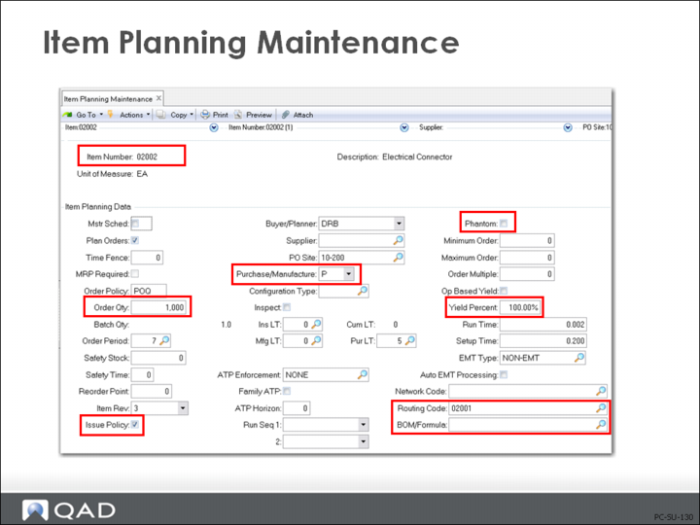
For costing purposes, the important fields in the planning frame of Item Master Maintenance (1.4.1), Item Planning Maintenance (1.4.7), and Item-Site Planning Maintenance (1.4.17) are the following.
Item Number
Item codes uniquely identify items or products such as raw materials, purchased or manufactured intermediates, finished items, packaging materials, configured products.
Note: As soon as an item record is added to the system, if the Item Status code permits, it can be transacted even if no costs are entered. This is a control issue for implementation planning. Also, when you are planning your implementation, consider any security and control issues that apply to access to the Item Master Maintenance (1.4.1).
Order Quantity
The normal order quantity for this item. When manufacturing costs are calculated using Routing Cost Roll-Up (14.13.13), setup costs are divided by this order quantity. If this quantity is left as zero, the system assumes an order quantity of one for cost calculations only.
Pur/Mfg
Product Structure Cost Roll-Up (13.12.13) will be affected by the Pur/Mfg code you assign to the item. The system assumes blank Pur/Mfg codes are [M]anufactured items.
[P]urchased Item. If your purchased item has a product structure and/or routing associated to it, it is not used in cost roll-up calculations. Instead, this-level labor, burden, and subcontract costs are zeroed out at the next roll-up. All lower-level costs are also zeroed out.
[D]RP item. The same cost calculation logic applies to these items as to purchased items. Any routing or product structure information is for reference only. If you have costed it as a manufactured item and then change it to a DRP (Distribution Requirements Planning) item, the next roll-up zeroes out all rolled costs from lower levels for this site (the default site when using (1.4.7) and the specified site when using (1.4.17), in addition to this-level costs for routing-controlled categories.
[M]anufactured item. Costs are calculated from routing and product structure roll-ups.
[R]outable item. Functions like manufactured item during cost roll-up.
[C]onfigured item. Costs are calculated from Product Structure Cost Roll-Ups if the components on the structure have a structure type code of blank. Configured products have costs calculated during sales order entry for margin calculations.
[F]amily Planning item. Costs are calculated from product structures and routings if the structure type on the components is blank.
The effect of these settings on cost is discussed on
here.
Issue Policy
Determines whether an item is treated as floor stock.
Yes: This item is issued to work orders.
No: This item is not issued to work orders and requirements print on a different section of the work order picklist under the heading “Floor Stock.” These are expense or bulk issue items that might or might not be planned by MRP.
When a work order (or cumulative order) is processed by the Accounting Close, the cost of any floor stock items is debited to WIP and credited to the Floor Stock account specified on the order.
Phantom
Phantoms are often used for transient assemblies or intermediate products - ones that are not (and often cannot) be received into stock but instead go directly into the next higher assembly or product. Phantoms are often used for service items.
Phantom set to Yes identifies this item and its product structure as a phantom
The effect of this setting on cost is discussed on
here and
here (Engineering Changes).
Yield%
Percentage of any order that is expected to be usable. Can be updated automatically by Routing Cost Roll-up 914.13.13).
The effect of this setting on cost is discussed on
here.
Routing Code
A code identifying the routing or process normally used in the manufacture of this item. Used only for manufactured items whose default routing/process definition is not stored under the item number.
Use of an alternate can cause a method variance to be calculated at Accounting Close. Usage and rate variances are calculated based upon the work order bill and routing used. If the alternate routing or bill calculates a value different from the standard, a method variance will be charged for the difference. If the values of the primary and alternates are of equal value, there will be no method variance calculated.
BOM/Formula
A code identifying the product structure, formula, and/or co-product/by-product structure normally used to manufacture this item. (For co-products/by-products, this is the base process code.) Used only for manufactured items whose default product structure/formula is not stored under the item number.
Key fields in other Item Data Maintenance frames, and their locations, are noted below.
Product Line (1.4.1), (1.4.3)
Each item record must be associated to a product line, which is then used to determine the default accounts for transactions of this item. (The product line accounts are discussed in detail in the Introduction to Costing training guide.)
Status (1.4.1), (1.4.3)
Item status can be used to restrict transactions for an item. Use this field in conjunction with Item Status Code Maintenance (1.1.5). Item status typically reflects the life cycle of an item.
Site (1.4.1), (1.4.5) or (1.4.16)
The site code identifies the geographical location of inventory. For more precise inventory valuation, transactions are reported by site as well as by entity.
• Each site is associated with a specific general ledger entity, allowing complete financial results to be maintained and monitored by site (or by groups of sites)
• Each site is associated with a specific product line that provides purchasing, inventory, work order and sales account defaults
Effect of Pur/Mfg Code on Cost
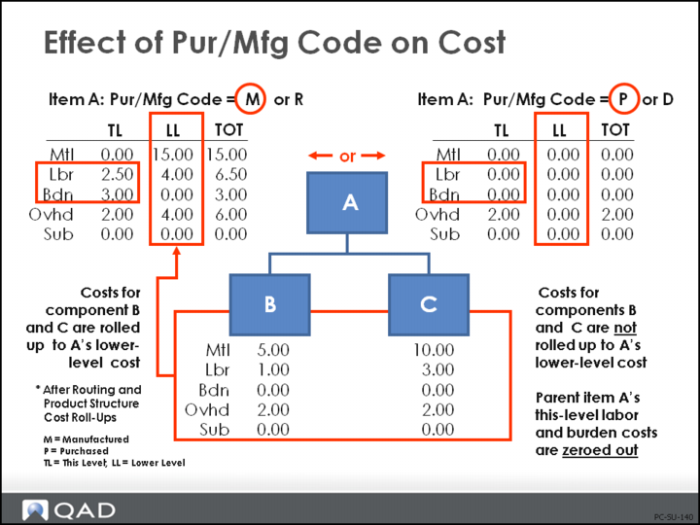
This example shows the difference in how a product structure coded as a purchased part rolls up compared to a product structure that is coded as a manufactured or routable part.
• When item A has a Pur/Mfg code of [M]anufactured or [R]outable and blank structure type in the product structure for components B and C, all lower-level costs for material, labor, burden, overhead, and subcontract roll up correctly from the routing and product structure cost roll-up functions. This would also happen if you were to change the code to [R]outable.
• If the Pur/Mfg code were incorrectly changed to [P]urchased for a manufactured item, and the routing and product structure roll-ups were performed, all lower-level costs for material, labor, burden, overhead, and subcontract would be zeroed out. Additionally, this-level costs for labor and burden would also be zeroed out. This would also happen if you were to change the code to [D]RP.
• If we had not rolled up the routing in the second set of data, then this-level labor and burden costs would have remained as they were in the first set of data. Remember, only a routing cost roll-up will affect this-level labor and burden for an item.