Introduction to Manufacturing
Manufacturing modules handle internal supply and demand—material is moved out of inventory into production, or finished goods or components are moved from production into inventory. These modules are used by make-to-stock, assemble-to-order, process, batch process, flow, kanban, and repetitive operations.
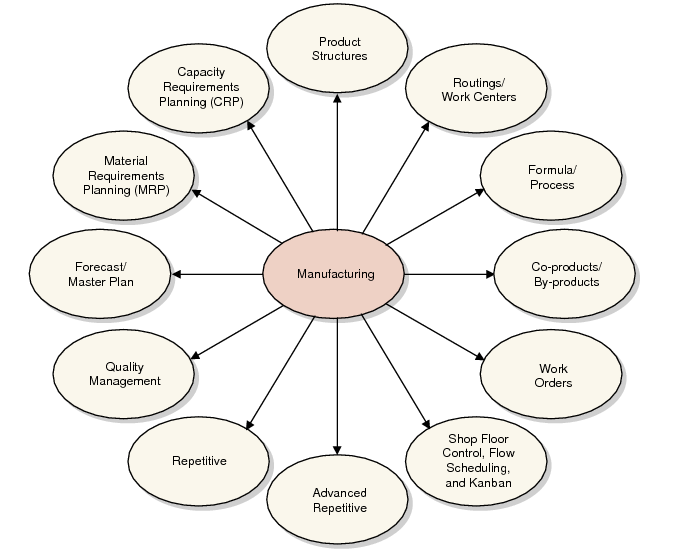
Manufacturing illustrates the manufacturing modules.
Manufacturing
Product StructuresOnce items such as products, components, and materials are identified in your system, the Product Structures module adds and maintains the bills of material for each product, assembly, subassembly, intermediate, and fabricated part.
Routings and Work CentersThe Routings/Work Centers module defines the areas where manufacturing activities are performed (departments, work centers) and the manufacturing process itself (operations and routings).
Formulas and ProcessesThe Formula/Process module defines and maintains the relationships between products and the ingredients that go into them, as well as the process by which they are created.Other Formula/Process functionality is discussed in conjunction with co‑products and by-products. Co-products/By-products is used to manage processes that create more than one product.
Co‑products and By‑productsCo-product/By-product features manage processes that create more than one product. The module includes tools for setting up items, structures, and routings and supports MRP, work orders, shop floor control, and costing.
Work OrdersThe Work Orders module is used in discrete production environments to control manufacturing orders. Create work orders manually or generate them from MRP planned orders. Generate work orders for configured products directly from a sales order. The Work Orders module supports co‑product and by-product manufacturing.
Shop Floor ControlThe Shop Floor Control module tracks activities and records operation status and labor times for manufacturing jobs released through the Work Orders module.
Advanced RepetitiveThe Advanced Repetitive module supports high-volume manufacturing where lead times are more than a day and up to a month or more; where work is continuous and lines are dedicated to one item for days, weeks, or months; and where work in process (WIP) costs are either variable or high enough to track closely.
RepetitiveThe Repetitive module supports high-volume manufacturing where lead times are one day or less, where WIP is complete at the end of each day, where WIP costs are tracked and batches do not overlap, or where WIP costs are insignificant or fairly constant.
Quality ManagementThe Quality Management module defines standard testing procedures, applies tests to work orders and repetitive schedules, records quality test results, and manages inventory sampling and quality work orders.
Forecasting/Master Schedule PlanningThe Forecast/Master Schedule Planning module lets you create and maintain shipment forecasts and master production schedules. Using this module, you can analyze sales shipment history, calculate forecasts, and update demand for material requirements planning (MRP), creating a closed-loop system.
Material Requirements PlanningMaterial Requirements Planning (MRP) is a key manufacturing planning function. It assesses supply and demand and generates planned order and action messages. For organizations with multiple sites, MRP can be used in conjunction with distributed requirements planning (DRP), which balances supply and demand among sites.
Capacity Requirements PlanningThe Capacity Requirements Planning (CRP) module uses MRP planned orders, other work orders, and repetitive schedules to determine work‑center load and generate a capacity requirements plan for a department, work center, or machine.
Lean Manufacturing Modules
In addition, lean manufacturing functionality is provided by the Flow Scheduling and Kanban modules.
Flow Scheduling
The Flow Scheduling module lets you create and manage the life cycle of time-phased production schedules for use in a flow-driven, lean manufacturing environment. Optionally, you can link flow scheduled orders with existing demand orders and work orders.
See User Guide: QAD Lean Manufacturing.
Kanban
The Kanban module lets you identify items that are kanban controlled, maintain kanban-related data for these items, print kanban cards on demand, and use kanban transactions to track and manage the movement of kanban‑controlled items in and out of the production process.
See User Guide: QAD Lean Manufacturing.