Setting Up Multi-Entity Processing
Multi-entity processing enables you to group entities together, so that you can save time by carrying out period end activities for multiple entities at once without the need to switch between entities. Multi-entity activities reduce data maintenance time and provide better control over routine and largely repetitive period end tasks.
The following activities are possible at entity group level:
• Entity GL Period Lock by Daybook
For more information on this activity, see
Applying a Daybook Mask to a GL Period.
• Revaluation Simulate
For more information on this activity, see
Simulating Revaluation.
• Revaluation Post
For more information on this activity, see
Posting Revaluations.
• Entity GL Period Lock
For more information on this activity, see
Entity GL Period Lock.
• Entity GL Period Report
For more information on this activity, see
Entity GL Period Report.
Note: When running one of the possible activities on an entity group, you can only select an entity group that contains the current entity; other entity groups are not visible. Any other restrictions that apply are described in the corresponding sections.
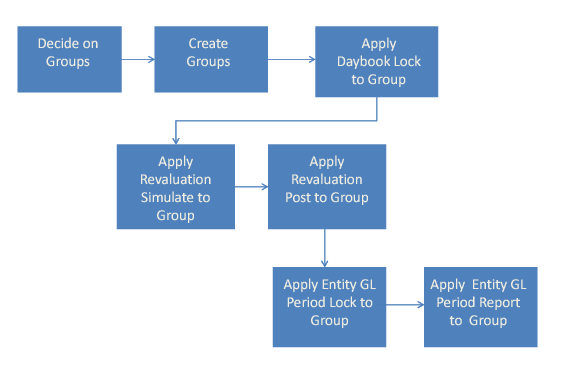
First, decide if multi-entity processing is applicable; if so, determine the entities to which multi-entity processing applies.
Shared Set Create illustrates the steps in creating and using entity groups. The current entity must be included in the entity group, and different entity groups can be used for each of the closing activities.
Setting Up Entity Groups
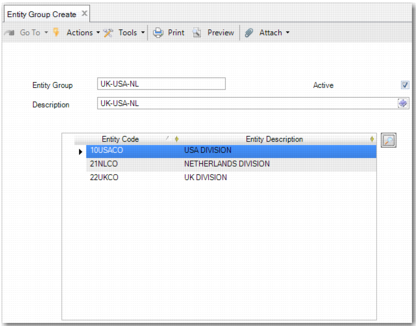
To create an entity group, use Entity Group Create (36.1.1.2.5).
Entity Group Create
Field Descriptions
Entity Group
Specify a code (maximum 20 characters) that identifies the entity group. This code must be unique within the current database, as entity groups are stored at database level. This field is mandatory.
Active
Indicate if this entity group is active.
Description
Enter a brief description (maximum 24 characters) of the entity group. You can optionally enter descriptions in more than one language. See
Introduction to QAD Enterprise Applications User Guide for more information on the Translation Option. This field is mandatory.
Entity Code
The entity code uniquely identifies the entity. This field is read only. Use the lookup icon at the top right of the grid to select entities to include in the group. The corresponding entity codes appear in the Entity Code column of the grid. The group must contain at least one entity. An entity group can include both active and inactive entities. There is no restriction based on the domain of the entity, and an entity can feature in more than one entity group.
Entity Description
This field contains a read-only description of the entity.
Click Save or Save and Create to create the entity group. To modify, view, and delete entity groups, use Entity Group Modify (36.1.1.2.6), Entity Group View (36.1.1.2.7), and Entity Group Delete (36.1.1.2.8) respectively.