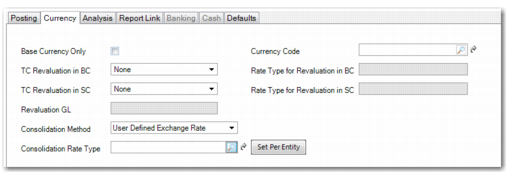
Currency Tab
Use the Currency tab to specify the currency attributes of the account. See
Setting Up Multiple Currencies for more information on the setup of foreign currencies.
GL Account, Currency Tab
Field Descriptions
Base Currency Only
Select to ensure that postings are performed in the base currency only. When selected, you cannot specify a currency code in the next field.
Note: For most accounts, this field is cleared. For accounts where transactions are enacted in a number of currencies, separate balances are maintained for each currency against the account.
Currency Code
Select a unique currency for the account. You typically enter a currency for accounts that use only a specific currency, such as bank and cash accounts, or customer and supplier control accounts.
Postings for the account use this currency only. If you do not specify a currency, postings can use any of the currencies configured for the entity. This field is disabled when you select the Base Currency Only option.
TC Revaluation in BC
Select a transaction currency revaluation method from the following options:
None: No revaluation is performed on transactions.
Accounting Rate: The accounting exchange rate for that date is used; this is the most common option.
Revaluation Rate: You can use a separate rate. For example, in certain countries, the government sets the rate that must be used for revaluation, and this is separate from the accounting exchange rate. See
Revaluation.
User Defined Rate: This option accommodates situations where different revaluation rules apply for particular types of assets.
Rate Type for Revaluation in BC
When you select User Defined Rate in the TC Revaluation in BC field, specify a revaluation exchange rate type for determining rates. Otherwise, this field is disabled.
TC Revaluation in SC
Select a revaluation method for the statutory currency. Select from None, Accounting Rate, Revaluation Rate, Statutory Rate, Inventory Rate, or User Defined Rate.
Statutory Rate: This option is available for revaluation relative to the statutory currency, and uses the statutory exchange rate. If the option is defined in Exchange Rate Type Create, the system can revert to using the accounting exchange rate if there is no valid statutory exchange rate available at the time of revaluation.
Inventory Rate: This option is available for revaluation relative to the statutory currency for Inventory and Work in Process (WIP) control accounts, and uses the inventory exchange rate.
You must revalue open balances in Inventory and WIP control accounts relative to the statutory currency to report closing valuations for the balance sheet. Inventory and WIP balances in statutory currency must be revalued to use the latest inventory exchange rate when:
• The inventory exchange rate type is used to calculate standard costs in statutory currency.
• Standard costs in base currency are reviewed periodically and the inventory exchange rates are modified.
Note: Base currency Inventory and WIP control account balances must be revalued in the books of a consolidation entity if the base currency of a source entity is different than that of the consolidation entity.
Rate Type for Revaluation in SC
When you select User Defined Rate in the TC Revaluation in SC field, specify a revaluation exchange rate type for determining rates. Otherwise, this field is disabled.
Revaluation GL
Specify an account to be used for revaluation postings.
Note: This field is activated if the account you are creating or updating is a control account or a tax account.
When the parent account is a control account or a tax account, the Revaluation GL account acts as a mirror balance account, to which revaluation differences of unrealized exchange profits and losses are posted. You cannot select a Revaluation GL account for bank, cash, open items, standard, or system accounts.
The revaluation account tracks unrealized gains and losses that occur on assets and liabilities that have not yet been converted to cash, such as AR. When the AR payment is received and converted to cash, the exchange gain or loss associated with that payment becomes a realized gain or loss. See
Revaluation.
Consolidation Method
If this account will be used by a domain that is the target of a consolidation, select the revaluation exchange method from the drop-down list. The exchange method of the account in the consolidation entity determines how subsidiary transaction amounts are converted to transactions in the consolidation entity. In each case, the system uses the exchange rates defined in the domain of the consolidation entity. See
Consolidation for details on consolidation setup.
The possible settings of the Consolidation Method are as follows:
Current Exchange Rate: The system recalculates the value of transactions based on current exchange rates.
Historical Exchange Rate: The system consolidates transactions at the exchange rate effective on the date of the transaction.
Simple Average Exchange Rate: The system determines a set value for a transaction by averaging the rates for the first and last dates in the range of transaction effective dates. For example, if transactions are imported for the month of January, the system averages the rates for January 1 and January 31.
Weighted Average Exchange Rate: The system determines a set value for a transaction by averaging the rates for all dates in the range of transaction effective dates. For example, if transactions are imported for the month of January, the system adds up the rates for each date (January 1, January 2, and so on) and then divides by 31.
User-Defined Exchange Rate: If you select the User-Defined Rate option, you must set up specific exchange rates for each subsidiary base currency, for each GL account with this method, and for each GL period. See
Revaluation.
Consolidation Rate Type
When you select User-Defined Exchange Rate for the consolidation method, specify a user-defined exchange rate type for determining rates. Otherwise, this field is disabled.
The Set Per Entity button enables you to specify a different user-defined exchange rate for each consolidated entity. You can apply the exchange rate to any account type for consolidation purposes. For each of the rate types that you specify here, you must also create the actual exchange rates before you can run the consolidation. These rates must be entered in the shared set used by the consolidation entity. To do this, use Exchange Rate Create (26.4.1).
Example: In the books of different entities, different historical rates were used to translate base currency equity balances to consolidation currency balances.