Modifying Entity GL Periods
Use the Entity GL Period activities (25.4.2) to manage the GL periods for a specific entity. You can lock and unlock application areas separately, so that the period can be open to sales transactions, but closed to inventory transactions.
Apart from Entity GL Period Lock (25.4.2.3) and Entity GL Period Report (25.4.2.5), the activities in this function cannot affect the other entities in a domain. It is possible to specify that Entity GL Period Lock and Entity GL Period Report apply to a group of entities within a domain.
You can:
• Lock periods to prevent further transactions or unlock them. For more information, see
Entity GL Period Lock.
• Report the period, closing it to further updates, and also undo the reporting if additional changes are needed. For more information, see
Entity GL Period Report.
Important: Running technical and business consistency checks is a prerequisite to reporting a GL period. See
Running GL Consistency Checks. You can run consistency checks from Entity GL Period Lock, Entity GL Period Unlock, Entity GL Period Report, Entity GL Period Report Undo, and Entity GL Period View.
• Delete a GL period if the period is open and no outstanding transactions exist for it.
Using Entity GL Period Create, you can also create entity-specific GL periods with a type of Correction or Year-End Closing. Normal GL period types are read only.
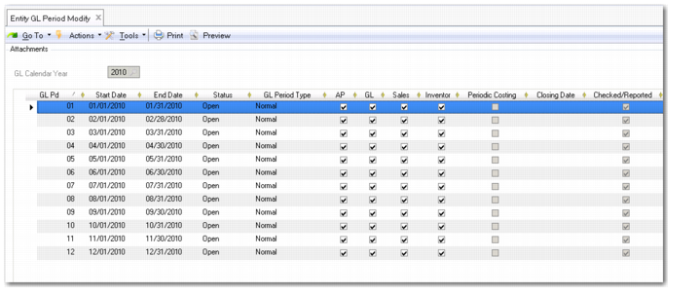
Entity GL Period Modify
Field Descriptions
Start Date
This field displays the official start date of the calendar period. You cannot modify the GL period start date. You must modify the GL period start date at domain level using Domain GL Period Modify (25.4.1.2).
End Date
This field displays the official end date of the calendar period. You cannot modify the GL period end date. You must modify the GL end date at domain level using Domain GL Period Modify.
Status
The system displays the current period status. You cannot modify this field manually; it is changed by the system when you lock or report the period.
GL Period Type
This field displays the appropriate period type, which is assigned by the system.
All periods are initially of Normal type. If you need special periods for year-end processing or corrections, create new GL periods of the appropriate type.
• Normal is the default standard period.
• Correction is used when a review of the year-end statements results in the need to make adjustments to the accounts before official publication. The correction period is normally the last GL period in the GL calendar year.
Note: Once you have created a Correction GL period for a GL calendar year, you cannot create any further periods of type Normal.
• Year-End Closing periods are generated by the system as part of the Year-End Closing process.
GL
Select to enable the creation of GL and Fixed Asset transactions for this period. When GL is cleared, all other areas are also cleared.
AP
Select to enable posting of AP transactions during this period.
Sales
Select to enable posting of AR transactions during this period.
Inventory
Select to enable posting of inventory and work order transactions from operation activity during this GL period.
Transactions affecting inventory accounts include purchase order receipts, work order issues or receipts, sales order shipments, physical inventory counts, and manual inventory transactions. Each transaction affects inventory by creating a GL transaction that either debits or credits the account value.
Periodic Costing
Select to enable posting of periodic costing transactions during this period.
You can open the Periodic Costing sub-ledger if Periodic Costing is activated for the current domain. You cannot open the Periodic Costing sub-ledger if any future GL periods are still closed for period costing.
You can re-open the Periodic Costing sub-ledger for locked or open periods if the GL sub-ledger is open and if all other sub-ledgers are closed. You can reopen the Periodic Costing sub-ledger from within Financials or using an API.
Note: In Entity GL Period Modify, you can manually close the Periodic Costing module for a particular GL period if there are no unposted Periodic Costing GL transactions and if there are no transient postings to Period Costing type daybooks for that period.
Closing Date
The closing date is generated automatically by the system.
Checked/Reported
This read-only field indicates that the GL period has been checked and reported.
Mark
This field displays a system-defined period mark for the period, if one has been defined.
Domain
This field displays the domain for which the GL calendar year was created.
Entity
This field displays the current entity.
Last Modified Date/Time/User
These system-maintained fields display the ID of the user who last updated this record, and the date and time of update.